Ice Makers
 Chairs
 Kettles
 Projectors
 Air Purifiers
 Dash Cams
 Headphones
 Smartwatches
 Blenders
 Humidifiers


The first podcasts were produced in the early 2000s, and took just over a decade to go mainstream. Since then, their growth has been exponential, with over 4.5 million registered podcasts globally and nearly 600 million listeners in 2025. In the US, 55% of people over 11 are monthly consumers.
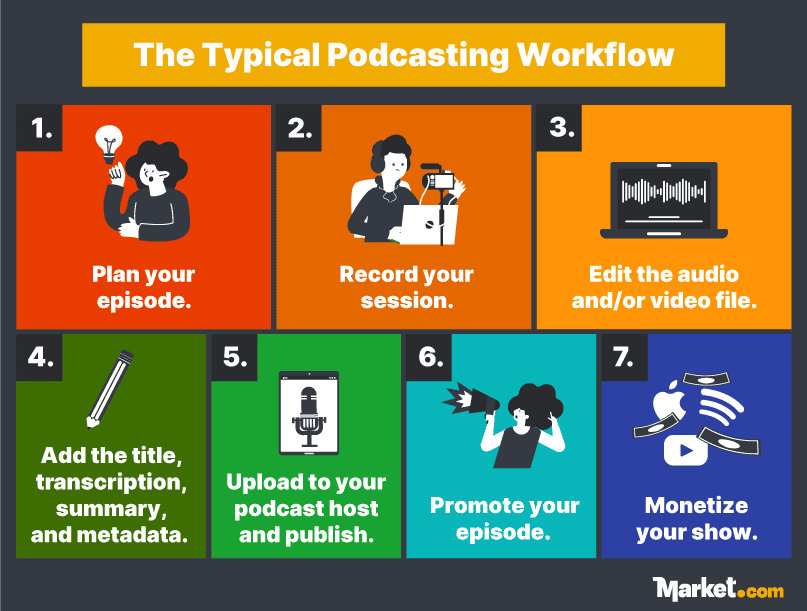
If you want to start a podcast, you can find products for every stage of the process. However, the right equipment and software matter, especially when you’re on a tight budget. We’ve curated over 100 types of podcasting equipment and tools across the full production workflow for new and established podcasters.
Podcast Planning Tools
You’ll need a strategy to get your podcast off the ground. A simple plan will do if this is a hobby. But you’ll need something more elaborate to build a profitable side hustle.
Start by defining your niche, target audience, and podcast format, and then consider the equipment, programs, and content ideas. Establishing a schedule and workflow also helps you stay consistent. This section covers tools for researching, planning, and branding your podcast.
Brainstorming and Project Planning
Content ideas can pop up at any time, and the tools on our list will help you capture your best ideas. Having a central repository for plans and projects also makes management easier.
Recommended Planning Tools
- NotebookLM: Google’s free AI-powered research assistant that summarizes content (sites, documents, audio, or video files). You can even repurpose the audio summaries into podcast content.
- MindMeister: MindMeister is an online visual mind-mapping tool for planning your strategy, episode ideas, and projects. The free plan allows for unlimited collaborators, making it ideal for team podcasts.
- Alitu Showplanner: Alitu Showplanner generates podcast ideas for you. Simply answer a few questions and it will suggest show names, show format, audience profile, content ideas, and a podcast pitch.
Scriptwriting and Outlining
An episode outline creates a more engaging and valuable show for listeners, while a simple script prevents you and your guests from going off topic.
Recommended Writing Tools
- CELTX: Designed for film scriptwriting, Celtx also works for podcasters with script templates and pre-production planning resources like call sheets and schedules.
- Scrivener: If your show needs elaborate scripts or you’re a budding writer, Scrivener is a professional writing tool that can help you organize show ideas, outlines, and scripts. You pay only a one-off license fee.
- Evernote: Podcasters can organize scripts, show notes, and files, and use Evernote’s templates. A bonus feature is the AI-powered transcriber, handy for processing your podcast shows.
Project Management
Project management tools help you plan, create calendars, manage schedules, and track project and production progress, while enabling cloud collaboration.
Recommended Project Management Tools
- Notion: Notion is a digital workspace for managing production processes, including episode planning, scheduling, and task management. Templates are available for production and project management.
- Trello: Trello is perfect if you’re a Kanban board lover. Create boards for podcast workflows, episode ideas, and publishing schedules, while working with team members.
Marketing Content Calendars
Marketing content calendars help podcasters to plan, manage schedules, and maintain a consistent publishing rhythm.
Recommended Marketing Content Calendars
- Hootsuite: HootSuite does the work of a social media assistant, helping you write posts and captions, post on schedule, track key metrics, and find the best times to post.
- Buffer: Buffer offers a free plan to manage your social media calendar and publishing. The AI assistant can generate content ideas, write posts, and optimize posting times for you.
- Zapier: Zapier connects apps to automate tasks and improve workflows. Integrate your calendar with podcasting and marketing apps and schedule episode uploads and social media posting.
Visual Branding
Visual branding elements — such as logo, cover art, images, and videos — form part of your podcast’s identity and can help your show stand out in a crowded market.
Recommended Visual Branding Tools
- Canva: Canva is a design tool for all your marketing needs. Pick from thousands of templates for social media, podcasts, and promotional content. You can even create a simple audio or video podcast.
- Looka: Looka is easy to use thanks to its drag-and-drop editor. Use the AI to create logos and browse through hundreds of branding kits, cover art, and social media templates.
- Snappa: Snappa is a web-based design platform that simplifies the design process. The free plan gives you access to over 6,000 templates and over 5 million high-resolution visuals.
Audio Recording Gear
Clear, high-quality audio depends on good recording equipment, proper microphone techniques, and an acoustically treated space. A proper studio or a room with sound-absorbing panels, rugs, or cushions can greatly reduce background noise and echoes.
You don’t need expensive equipment to start a podcast. We’ve shortlisted highly reviewed microphones, headphones, audio interfaces, mixers, and portable recorders ideal for beginners.
Microphones
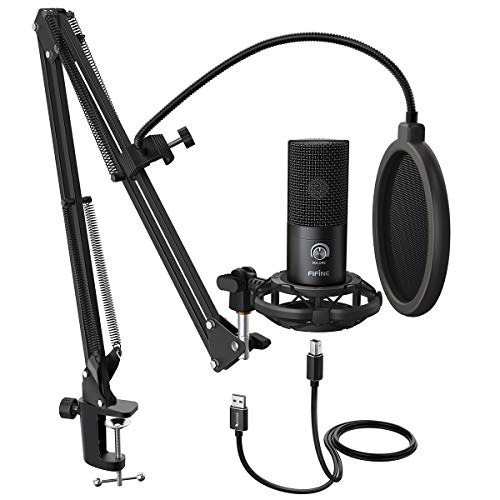
An external mic delivers much clearer audio than a computer’s internal mic. Good mic techniques, like maintaining a steady distance from the receiver, also help produce better audio.
Mic Types
Dynamic mics are less sensitive to sound, and they’re more forgiving when not in a studio. They’re affordable and typically work without a power source, which is ideal for mobile recording. Condenser microphones, on the other hand, are more expensive as they capture a wider range of sound frequencies, which is ideal for recording in a controlled studio setup.
Mic Connection Types
USB-connected mics have onboard converters, which convert analog sounds to digital signals. However, you’re stuck with the built-in converter quality. XLR-connected mics lack onboard converters and need an audio interface or mixer, which ultimately give you more control and better audio quality.
Recommended Microphones
- Samson Q2U: The Samson Q2U is a solid entry-level dynamic microphone with USB and XLR connections. The cardioid pickup pattern minimizes the recording of noise coming from the sides and rear.
- Audio-Technica AT2020: The AT2020 is a condenser mic with USB and XLR connections. It features a cardioid pickup pattern for noise reduction and a built-in headphone amp for better monitoring in real-time.
- RØDE NT1 5th Generation: The RØDE NT1 is a condenser mic with a low self-noise (the sound a mic produces) of 4.5dB. It records in 32-bit float (the standard is 24-bit) for more precise sound recording.
Headphones
A headphone helps you monitor the audio as you are recording, allowing you to adjust your mic technique or detect background noise in real time. Unlike open-back headphones, closed-back models are better for podcast recording because their sealed earcups block external noise and prevent headphone noise from being picked up by mics.
Headphones also have drivers that convert electrical signals to sound waves. The typical range is 20mm to 50mm. Higher quality headphones tend to feature a higher value.
Recommended Closed-Back Headphones
- Beyerdynamic DT 770 Pro: Soft, plush earpads provide comfort during hours-long sessions. Although pricey, the German engineering, good noise isolation, and high-resolution sound are worth the investment.
- Audio-Technica ATH-M30x: Audio-Technica is a German brand known for superb audio quality. The ATH-M30x features 40mm drivers for good sound reproduction and a wallet-friendly price point.
- Sony MDR-7506: The Sony MDR-7506 offers 40mm drivers for good sound clarity and folds compactly for travel. The earpads may wear down more quickly than other headphones, but are easily replaceable.
Audio Interfaces
An audio interface converts analog sound to digital. Many entry-level models can record at a depth of up to 24-bit — a measure of sound resolution similar to image resolution — and at a sample rate of up to 192kHz, which is how often a sound wave is sampled and affects recording accuracy.
An audio interface also acts as a hub, connecting mics, mixers, and other devices. One handy feature of audio interfaces is their built-in mic preamps, which amplify mic sounds without introducing distortion. New podcasters may not need an audio interface, unless using XLR mics.
Recommended Audio Interface
- Focusrite Scarlett Solo 3rd: Get professional audio quality (24-bit/192kHz) with this entry-level audio interface. Comes with 2 channel inputs and mic preamps in a portable design.
- Rode AI-1: Rode AI-1 is a base-level audio interface with a compact design and affordable price, and records at a depth of 24-bit and a sample rate of up to 96kHz. The single mic input is adequate for solo podcasters.
Audio Mixers
An audio mixer combines multiple signals into a single output to create a cohesive podcast with music, dialogue, and sound effects (SFX). You can isolate each audio signal and enhance it, while also reducing noise to produce a more polished show.
For podcasting, key buying factors include mic channels, mic preamps, and equalization (EQ) controls. EQ allows you to adjust different sound frequencies to “equalize” the tone by amplifying frequencies you want and removing any that are hazy or unwanted. A 3-band EQ lets you adjust low (bass), mid, and high (treble) frequencies.
Although a mixer isn’t essential for podcasting, you can consider it when you’re ready to improve your show’s production value.
Recommended Audio Mixers
- Mackie Mix Series Mix8: This portable mixer offers eight channels including two mic inputs and a 3-band EQ on all channels. It packs a punch at a reasonable price for new podcasters.
- Zoom Podtrak P4: The Zoom Podtrack P4 is a mixer and recorder in one, with four mic inputs, four headphone outputs, and 3-band EQs. The “mix-minus” feature is great for recording remote interviews.
- Yamaha MG10XU: Offering 10 channels, the Yamaha MG10XU has mic preamps, 3-band EQs, and onboard SFX and audio control for professional mixing. It’s pricey if you’re on a tight budget.
Laptops
Laptops are great for recording, editing, and publishing from anywhere, but keep in mind that desktops are better suited for heavy production work and multiple equipment connections. Look for adequate CPU power for production work, ample memory (RAM) for multitasking, large drives for storing files, and fast Wi-Fi for uploading podcast episodes.
Recommended Laptops
- Acer Aspire 5: The Acer Aspire 5 has solid specs for recording and editing and comes with 512GB storage. The backlit keyboard improves visibility in low-light conditions and Wi-Fi 6 guarantees reliable uploads.
- Apple 2025 MacBook Air with M4: The 2025 MacBook Air has a long battery life, M4 chips, and 32GB RAM to avoid lags — all in a lightweight design. However, the 13-inch screen isn’t the most comfortable for long editing sessions.
- HP Spectre x360 14: The Spectre’s 2-in-1 form factor lets you use it as a 14” tablet or laptop. It comes with Intel Evo Core Ultra 7 chips, 16GB RAM, 1TB storage, and Bang & Olufsen speakers that deliver relatively high-quality audio.
Portable Recorders
A portable recorder is a battery-operated device for recording high-quality audio. Some models come with built-in mics, while advanced models can function as an audio interface.
Consider buying one if you’re often recording on the go, and look at the number of mic inputs, battery life, and SD card capacity for storing audio files.
Recommended Portable Records
- RØDE VideoMic Me-C+: Good for solo podcasters with one directional mic, a headphone jack, and a furry windshield for wind-noise reduction. You can also clip it onto your phone or tablet.
- Zoom H1Essential: A portable recorder with 32-bit float capability to capture a wider range of amplitudes. With built-in mics and 1TB of storage, it’s perfect for podcasters always out and about.
- Tascam DR-40X: Record professional-quality sound with the Tascam DR-40X that doubles as an audio interface. It features dual recording for distortion-free audio, two built-in mics, and two XLR inputs.
Audio Production Software
Editing is where your podcast recordings truly come to life. You can remove background noise, long pauses, and filler words from your audio, and then jazz things up with an intro, music, and SFX. Here are some free and paid editing tools, plugins, and AI helpers to get you started.
Free Audio Editors
Free audio editors aren’t necessarily for beginners; some deliver powerful features. This includes free digital audio workstations (DAWs) — advanced editors that enable recording, mixing, editing, and mastering tracks.
Recommended Free Audio Editors
- Audacity: Audacity is one of the most popular free and open-source platforms for recording and editing audio for any skill level. When you download it from MuseHub, you’ll be able to access free music and SFX.
- GarageBand: Apple users will love this DAW, made for recording, editing, mixing, and sharing tracks. GarageBand is also pre-loaded with SFX and virtual instruments, and is user-friendly.
- Ocenaudio: Ocenaudio is a fast, user-friendly editor with real-time audio previews and multitrack editing, making it easy to edit multiple podcast episodes at once.
Beginner-Friendly Audio Editors
Beginner-friendly audio helps make it easy to get started with affordable pricing and features like recording, transcription, and auto-editing.
Recommended Audio Editors for Beginners
- Descript: Record high-quality audio and 4K videos on Descript. The basic plan gives you access to the AI editor that cuts filler words, transcribes, and writes show notes and titles.
- Alitu: Alitu is an online podcast creation platform for recording, editing, and distributing your show. The editing tools are simple and the editor uses a drag-and-drop interface.
Advanced Audio Editors
Designed for professionals and audiophiles, these audio editors and DAWs include features such as spectral frequency views for more granular editing, multitrack editing, and audio restoration for better production control.
Recommended Advanced Audio Editors
- Hindenburg Pro: With Hindenburg Pro, you can record and edit multitrack audio, mix, and restore audio. The Voice Profiler tool can generate a unique EQ for each podcast speaker.
- Logic Pro (Mac): This is a more advanced offering than its sister software, GarageBand. Logic Pro delivers features such as multitrack editing, high-quality processing, and advanced audio effects.
- Reaper: Reaper is an affordable open-source DAW with an extensive feature set. Record, edit, and mix your show and customize Reaper’s interface just the way you like it.
Plugins
Plugins extend the capabilities of your audio editor, unlocking powerful features such as audio restoration, compression, and automatic audio file cleanup.
Recommended Plugins
- Supertone Clear: Supertone Clear helps to remove noise and reverberation from your recording. It can also edit in real time, perfect for live podcast recording.
- Waves Vocal Rider: A voice leveler to get consistent volume levels for all speakers and narrators in your podcast. Set a target level for the vocal, and Vocal Rider will adjust accordingly.
- Sonible smart:EQ 4: The sonible smart:EQ 4 has AI tools to adjust the EQ for tonal balance. You can also do multi-track edits and spectral edits using a drag-and-drop editor.
AI-Powered Audio Editors
AI-powered audio editors are useful for beginners or solo podcasters. They can help clean up your audio, enhance the quality, and automate the podcast editing workflow by exporting and uploading files to podcast hosts.
Recommended AI Audio Editors
- Auphonic: Auphonic can balance loudness between speakers while de-amplifying background noise. It can process multiple files simultaneously and upload your file to hosts and publishers.
- Cleanvoice AI: Remove background noise, filler words in over 20 languages, long silences, and distracting vocal sounds from your file. The AI can also generate transcriptions and audio summaries.
Royalty-Free Music and Sound Effects
Music and sound effects help define your podcast’s brand. You should choose them with your audience in mind, but be mindful of intellectual property (IP) laws; using a copyrighted song in a TikTok video could lead to your post being removed. Check out our list of free music libraries, paid platforms, and AI music tools to get started.
Free Libraries
Free audio libraries host a wide variety of music you can use commercially. However, check the individual terms as there are different licensing requirements.
Recommended Free Audio Libraries
- Freesound: Access over 700,000 sounds under the Creative Commons license on Freesound, with smart search tools and community support.
- Pixabay: Primarily known for graphics, Pixabay also has over 180,000 free music tracks and SFX for commercial use. Browse by category or explore trending audio.
- YouTube Studio Audio Library: The YouTube Studio Audio Library provides royalty-free production music and SFX for content creators, with monetization rights for those under the YouTube Partner Program.
Subscription-Based Audio Libraries
Paid platforms license tracks from artists and then license the content to paying customers, providing them with unlimited access to music for commercial purposes.
Recommended Paid Audio Libraries
- Epidemic Sound: Browse Epidemic Sound for royalty-free music, SFX, and AI voiceovers. The basic plan covers licenses for podcasts, social media, and online. The company also offers custom music production.
- Soundstripe: The Soundstripe catalogue hosts music, SFX, and videos. Try the handy AI search assistant that will find you the right sound for your show.
- NEO Sounds: Choose over 80,000 songs by professional producers on NEO Sounds. Instead of a subscription, you pay per song and each purchase comes with a license that never expires.
- Musicbed: Musicbed delivers a curated music library meant for ads, TV, and films, so expect premium pricing. Adding SFX access will also increase your subscription cost.
AI-Generated Music Tools
Create your own unique sound with AI-powered music generators that turn your prompts into original tracks. However, audio quality will vary.
Recommended AI Music Generators
- Suno: Suno is an AI music generator that exports to audio editors and DAWs. You can generate 10 songs daily for free but you need a paid plan to monetize.
- Beatoven.ai: If you don’t want to get locked into a subscription, Beatoven lets you pay per AI-generated track. Download files in MP3 or WAV formats.
- Mubert Render: Mubert Render generates royalty-free music for podcasts and social media, plus a studio to create tracks using your own samples. It offers a free tier (“Ambassador”) with limited use, as well as paid plans.
Sound Effects (SFX) Libraries
Sound effects can set the mood, support your podcast’s message, enhance the listening experience, and improve your branding. Music libraries often also offer SFX, but the following providers primarily offer SFX.
Recommended SFX Libraries
- ZapSplat: Access more than 160,000 SFX, where a small portion is free. Zapsplat also offers theme-based packs with all sounds professionally recorded and edited by sound designers.
- The BBC Sound Effects Archive: Looking for something more natural-sounding and unique? The BBC hosts over 33,000 SFX recordings from their production work spanning 100 years. Commercial use requires a fee.
- Boom Library: Widely trusted by film, TV, and game audio pros, Boom Library provides top-quality SFX. Free effects are available but limited, so this is better suited for podcasters with a large budget.
Podcast Hosting and Management Solutions
A podcast host stores your podcast files online, generates an RSS feed, and distributes the feed to publishers like Apple or Spotify.
Many hosting platforms also provide additional services, and they are sometimes called a podcast management solution (PMS). A PMS manages all or parts of the podcasting process, from recording and editing to publishing and monetizing.
For beginners, you can start with a mic, recording software, and a PMS. As your needs grow, you can upgrade to more advanced tools to improve your show’s production value. Our list covers podcast hosts and comprehensive PMS options that cater to every podcaster’s needs.
Beginner-Friendly Podcast Host and Management Solutions
The platforms in this section offer an intuitive user interface (UI), learning resources, or provide extensive resources to help new podcasters.
Recommended Beginner-Friendly Podcast Hosts
- Podbean: Podbean is a full-fledged PMS and publisher. You can record (only on the app), edit, host, publish, promote, and monetize, giving podcasters a completely integrated workflow.
- Spotify for Creators: Spotify for Creators is a free PMS, allowing you to host, distribute, and monetize on the platform. Its analytics and marketing tools are useful even if you’re hosting elsewhere.
- Buzzsprout: Buzzsprout will host, distribute, and manage your podcast, and offers editing tools like automated audio clean-up. You can also build a private subscriber base to earn money.
- RSS.com: On the free plan, you’ll get unlimited hosting, analytics, promo tools, and a free website. The catch is that you can only monetize your show if you are on the paid plan.
Podcast Host and Management Solutions with Advanced Analytics
Advanced analytics feature allows you to access detailed listener demographics and track competitors and marketing campaigns. Some platforms deliver IAB-certified analytics, an industry standard that filters out spam traffic to provide a more accurate picture of your listeners.
Recommended Advanced Podcast Analytics
- Ausha: This podcast host provides IAB-certified analytics and lets you compare episode performance, monitor competitors, and track keyword trends.
- Libsyn: Libsyn is a podcast host with IAB data that’s verified by third parties. You can review maps, charts, and key insights into your audience.
- CoHost: CoHost provides extensive audience insights that cover detailed audience demographics, marketing metrics, and an in-depth dashboard. You can also host and monetize your podcast.
Video Podcasting Tools
Video podcasts are growing, and shows without videos can struggle to top the charts. In the US, 32% of all podcast listeners and 46% of regular listeners prefer video over audio podcasts. Video adds visual cues and context often lost in audio podcasts, and is easier to share on social media.
We’ve shortlisted key recording, live streaming, and video editing tools for you to create high-quality videos.
Recording and Live Streaming
Video podcast recording software can capture videos and support live streaming, a popular format that adds authenticity and enables real-time interaction with your audience.
Recommended Video Recording Tools
- Zencastr: Record 4K video and 48kHz audio without time limits with Zencastr. The AI tool can remove noise and filler words and generate transcripts.
- Riverside: Riverside will record 4K videos on your local drive, so you won’t lose them. Popular among podcasters, you can invite guests, manage interviews, and run live streams too.
- Restream: Stream 4K live or recorded videos to 30+ platforms with Restream. The free plan includes watermarks and limits streaming to 2 channels.
Video Editing
Video editors make it easy to produce professional videos. You can combine multiple clips, add transitions, adjust audio volume or playback speed, and correct the color grade and lighting.
Recommended Video Editors
- Final Cut Pro: Final Cut Pro is an Apple product that many consider the industry gold standard in editing. It has a user-friendly interface and loads of AI features like background masking and color grading.
- Kapwing: An easy-to-use, online video editor, Kapwing lets you edit videos or audio and collaborate with your team seamlessly. The free plan only offers 720p-quality videos, which is good enough for social media.
- DaVinci Resolve: Davinci Resolve is a free, professional-grade editor with extensive editing tools for video, audio, special effects, and colour correction. It might have a steep learning curve for beginners.
- Adobe Creative Cloud Pro: Adobe Creative Cloud Pro is pricey, but offers advanced editing features and professional-grade tools, and allows you to work across Adobe’s suite of products. The Creative Cloud plan comes with 100GB of cloud storage and 4000 credits for their generative AI per month.
Analytics and Marketing Tools
While many podcast management systems include analytics and marketing features, standalone tools can be more powerful. They can pinpoint what’s working in your shows and campaigns, so you can make better data-driven decisions. We’ve compiled a list of tools to track performance and grow your podcast audience efficiently across multiple platforms.
Dedicated Podcast Analytics Tools
Your podcast host likely includes basic analytics, which may not be enough as your show grows. The tools we list come with rich data sets, and some provide IAB-certified data.
Recommended Analytics Tools
- Podder: Podder delivers in-depth analytics with audience demographics, household data, rank tracking, and custom reports. Understand your listeners further with the AI-generated listener personas.
- Podtrac: Review IAB-certified data on Podtrac, covering audience demographics and consumption patterns. You can use it for free but with limited features and data history.
- Podkite: Podkite is the first system to track chart rankings with data as far back as 2018. The analytics also cover downloads, traffic, and keywords, as well as a dashboard with collated user reviews.
SEO Tools
Search engine optimization (SEO) improves your podcast’s visibility on search engines and podcast publishing platforms. The right tool will help your show rank higher in relevant searches, making it easier for listeners to discover and subscribe.
Recommended SEO Tools
- PodSEO: PodSEO helps boost your podcast’s discoverability with AI-driven analytics, metadata suggestions, keyword optimization, and performance tracking.
- Google AdWords Keyword Planner: This is a free keyword planner to explore search volumes and discover new keywords in your show’s niche. You’ll need a Google Ads account and an active campaign.
Email Marketing
Building an email subscriber base is a great way to engage loyal listeners and attract new ones. You can use it to promote special episodes and share new campaigns or merchandise.
Recommended Email Marketing Tools
- Kit (formerly ConvertKit): You can create email lists, manage newsletters and campaigns, build landing pages, and automate workflows with Kit. You won’t be charged for the first 10,000 email subscribers.
- MailerLite: MailerLite has an AI-powered drag-and-drop editor, a landing page builder, and an email workflow automation feature. On the free plan, you’re limited to 500 email subscribers.
Content Repurposing Tools
Repurpose your episodes into social media posts, blog posts, emails, or newsletters to reach new audiences and engage with existing listeners, keeping your brand top of mind.
Recommended Content Repurposing Tools
- Headliner: Headliner repurposes videos or converts your audio files to video for social media. The AI tool can generate imagery or find top moments in your video.
- Repurpose.io: Convert your podcast to promo videos and social media updates with Repurpose.io. You can set up automated workflows and publish to social media channels.
- Flowjin: Flowjin offers a free plan that lets you process files for 1 hour/month. Save time with the built-in AI automation that includes transcription services.
Communities and Collaboration Platforms
Networking with other podcasters and industry players can help you stay inspired and up to date with industry trends. You can exchange ideas, learn about new tools or techniques, and cross-promote your show. Solo podcasters may feel a little less lonely by joining communities.
Whether you’re a newbie or an experienced podcaster, we’ve found communities and resources to grow your skills, build relationships, and expand your podcast’s reach.
Social Media Communities
Private groups on social media help you find like-minded people and be part of a community that just gets what you do.
Recommended Facebook Groups
- The Podcast Movement: Join this group’s 32,000+ members and connect with podcasters who can answer your questions. The group hosts the Podcast Movement Conference, an event for industry players.
- Podcasters’ Support Group: A Facebook group with 43,000+ community members. You’re allowed to promote your podcast during a weekly event that runs every Friday to Sunday.
Forums and Directories
Forums and directories host a treasure trove of resources and podcasting insights. Join discussions, help others, and stay updated with the latest industry news.
Recommended Forums
- Subreddit r/podcasting: Join over 160,000 fellow podcasters discussing podcast equipment, processes, and monetization strategies. You can self-promote in designated areas or by moderator approval.
- IndiePod Community: IndiePod Community is an online space for independent podcasters. Participate in forum discussions and monthly events, or enroll in courses to elevate your show.
Guest Booking
If you’re struggling to find guests for your show, try guest booking services. They can recommend suitable guests, manage outreach, and schedule interviews.
Recommended Guest Booking Services
- PodMatch: Create a host profile and let PodMatch’s AI match you with ideal guests. This premium platform also automates scheduling and admin tasks, and comes with a 100% money-back guarantee.
- MatchMaker.fm: With over 2,500 potential guests, you’re sure to find someone who aligns with your brand. Create a shortlist or get recommended matches, then chat, and schedule when you’re ready.
- Talks.co: Talks.co is an AI-driven guest matching service. You can use it for free but you’re limited to 1 connection per month. Browse the guest database, receive matches, and book interviews.
Monetization Platforms
Podcasts often begin as passion projects, but production costs can quickly add up. With a solid subscriber base, however, your show can be a reliable income stream. This section explores ways to earn from your podcast, such as ads, premium subscriptions, ad marketplaces, affiliate marketing, and merchandising.
Publisher Ads and Sponsorships
Podcast publishers and hosts can insert ads into your episode in real-time that are tailored to individual listeners. The standard pricing model is by cost per mille (CPM), where you earn a set amount for every 1,000 ad impressions your show delivers.
- Spotify Partner Program: Eligible podcasters earn 50% of the ad revenue played in their episodes. Although premium Spotify subscribers don’t see or hear ads, podcasters still get paid based on the number of streams.
- YouTube Partner Program: This program enables eligible content creators to earn from ads and sponsorship. If your viewer is subscribed to YouTube Premium (without ads), you get a portion of their subscription fee when they watch your content.
- Wondery: Owned by Amazon, Wondery is a podcast publisher that allows you to receive ad revenue once your show is on their network with an established listener base.
Paying Subscribers
You can create a paid private membership that offers exclusive content, ad-free listening, and other perks. Many podcast hosts offer this feature too, so check yours.
Recommended Private Membership Tools
- Apple Podcast Subscriptions: Build a loyal fan base and keep 70% of subscription fees through Apple Podcast Subscriptions. You need to join the Apple Podcasters Program, though, which has an annual fee.
- Paid subscription under Spotify for Creators: Eligible podcasters can set up a monthly subscription if the show is hosted on Spotify. Podcasters with shows that are hosted on a Spotify Partner such as Patreon are also eligible.
- Supercast: Supercast charges a flat fee of 59 cents per subscriber, plus payment processing fees. Signing up is easy and you and your subscribers get same-day customer support.
Podcast Ad Marketplaces
Podcast ad marketplaces are platforms that connect advertisers with podcasters, enabling mutually beneficial connections between podcasters and advertisers.
Recommended Ad Marketplaces
- Audacy: Find the right advertiser that aligns with your brand at Audacy. Set rates, choose ad formats (branded content, reviews, automated ads) and work directly with brands.
- AdsWizz: AdsWizz is a programmatic ad marketplace, offering dynamic ad insertion, precise targeting, and real-time campaign monitoring for podcasters.
Audience Support
Some of your loyal listeners will be eager to show appreciation for your podcast, and you can easily create a way for them to donate to your show.
Recommended Audience Support Tools
- Patreon: Patreon allows content creators to share exclusive content and nurture communities, taking around 10% in fees. The platform can also host, distribute, and manage your shows.
- Buy Me a Coffee: Keep 95% of earnings with Buy Me a Coffee. Listeners can contribute monthly, yearly, or by a one-off payment to support your creative work.
Affiliate Marketing
Podcasters earn commissions by promoting a company’s products or services to their audience by sharing unique links or promo codes. It’s a low-risk monetization strategy that works best when the promoted products align with your show’s niche.
Recommended Affiliate Programs
- Amazon Associates: Add Amazon affiliate links to your podcast website and social channels and start to earn commissions, ranging from 1% to 10% depending on the product category.
- Commission Junction (CJ): Expect rates between 3% and 50% when you join CJ, a large affiliate provider dishing out over $1.8 billion annually to affiliate marketers.
- Impact: Impact lets you discover affiliate products, manage and track performance, and optimize campaigns. You can also negotiate direct partnerships with brands for better deals.
Merchandise
Merchandising is a great way to earn passive income. Print-on-demand (POD) tools allow you to design and sell branded clothing, stationery, and more, without worrying about warehousing and order fulfillment.
Recommended POD tools
- Printify: Printify ships to 209 countries and territories and offers 1300+ products. Create branded products, integrate with your online shop, and choose fulfillment partners worldwide.
- Printful: Design and sell custom merchandise using Printful’s user-friendly design tools. It also integrates seamlessly with your online store. Upgrading to a paid plan unlocks product discounts.
Transcription and Accessibility
Well-crafted transcripts, metadata, and show notes can significantly boost your SEO rankings. Transcriptions are also crucial for deaf people or those with hearing issues, widening your show’s appeal. This section covers AI-powered transcription tools, some of which offer human verification for greater accuracy.
AI-Based Transcribers
AI transcribers employ machine learning algorithms to convert spoken language into written text in the language of your choice.
Recommended AI Transcribers
- Otter.ai: Otter.ai transcribes files or live recordings, generates summaries and show notes, finds promo quotes, and allows text editing and team collaboration. It also offers a free plan with limited features.
- Trint: Trint converts your podcast to text, generates subtitles for video podcasts, translates into 40+ languages, and supports multiuser access. However, there are no free plans on Trint.
AI-Based Transcription with Human Input
Although AI can transcribe quickly, sometimes you need human input for accuracy and to preserve language nuances that algorithms may miss.
Recommended AI Transcribers with Human Verification
- Rev: Generate real-time transcription and subtitles in many languages, then ask the AI any questions about your transcript content. Human verification costs extra.
- TranscribeMe!: Choose AI transcripts from $0.07/min or AI with human input from $0.79/min. Download in text, Word, PDF, HTML, or SRT files.
Learning Resources
Our recommended learning resources can help you improve or maintain your skills across this fast-moving industry. We’ve included books, paid courses, and free resources to help lift your game.
Courses
Podcasting courses can teach you podcast strategies, the technical details of producing a podcast, and the creative aspects of podcasting.
Recommended Podcasting Courses
- Udemy (Podcasting Masterclass): Designed as an ultimate guide for new podcasters, this Udemy course teaches you all the basics (including promoting and monetizing) over 5+ hours of videos.
- Adobe (Multimedia Content Creation): Learn to create podcasts and multimedia content while understanding basic storytelling and content strategies. You’ll also learn how to use Adobe software like Adobe Express.
Blogs
Podcasting blogs are a free and invaluable resource for learning strategies and tips, reading product reviews, and staying on top of industry news.
Recommended Podcasting Blogs
- The Podcast Host: You’ll find resources that cover every stage of the podcasting workflow here. The platform also hosts a podcast academy with courses, tools, and coaching.
- Podnews: Podnews is best known for its daily newsletter with over 33,000 subscribers. On the website, you can catch up on news and check out upcoming industry events.
- The Buzzsprout Blog: Buzzsprout’s blog is a goldmine for new podcasters, offering clear how-tos, FAQs, and practical advice. It also tackles the emotional challenges creators face when building their shows.
Books
Podcasting books deliver a more comprehensive study or guide for podcasters, often with expert insights.
Recommended Podcasting Books
- Podcasting for Dummies: The Dummies series is renowned for its clear, accessible explanations, and this book is no exception. Dive straight into the nuts and bolts of production with practical tips included.
- Out on the Wire: This book aims to help you master the art of storytelling, revealing the creative processes used by popular radio shows and exploring what resonates with listeners.
YouTube Channels
YouTube is a fantastic free resource where you can learn almost anything, from buying the right equipment to making money from your podcast.
Recommended YouTube Channels
- Buzzsprout tutorials: Packed with 500+ videos, you’re bound to find the right tutorial on this channel. Watch interviews with industry experts, go behind the scenes, and learn how to start and run a podcast.
- Riverside: Riverside’s YouTube channel hosts over 1000 videos. From learning how to use Riverside like a pro to reaching your first 100,000 subscribers, you’ll gain a lot here.
The Bottom Line
Starting and running a podcast is neither expensive nor complicated. With just a laptop, a few essential pieces of gear, and the right software, you can produce a high-quality show. You can start small, figure out what works for you, and upgrade your tools as your listener base widens.
At its core, podcasting is about sharing your story, connecting with your audience, and learning together. By keeping up with industry trends and staying true to your voice, you can create a relevant and impactful show.