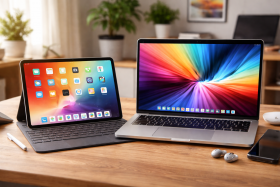
Looking for a new device and can’t decide whether to grab a tablet or a laptop? You’re not alone. It’s a common source of confusion with modern tech. While both can handle browsing, streaming, and light work, each shines in different areas.
To help you decide, this guide walks you through the key differences between tablets and laptops, focusing on how you’ll use them day to day and what each device is best suited for.
Key Differences at a Glance
Processing Power and Performance
When it comes to raw power and ability, laptops take the crown without much of a contest. They’re built around full desktop-level processors that can handle demanding tasks like video editing and 3D rendering. Running multiple applications simultaneously without breaking a sweat is what laptops are made for.
Tablets, on the other hand, use mobile processors that prioritize optimization and battery efficiency over raw power and performance. That’s not to say they don’t still have a kick to them, though. Modern, top-spec tablets are still highly capable, and their processing power shouldn’t be immediately dismissed. That said, at the lower and middle tiers of the range, it’s still an easier starting point to think of them as a more powerful, supersized mobile phone.
This performance gap becomes most obvious when you’re trying to run demanding software or juggle multiple tasks at once. A laptop can comfortably handle dozens of browser tabs, a video call, document editing, and music streaming all at the same time. Try the same on most tablets, and you’ll quickly find yourself dealing with apps reloading, slower response times, and a generally more frustrating experience. That’s not to say tablets are slow; they can be incredibly efficient at what they’re designed for, but they’re simply not built to be workhorses.
Software compatibility is where the divide becomes even clearer still. Laptops run full desktop operating systems that can handle a wider range of software from a wider range of sources. From professional content editing and creative suites to specialized business applications, open-source apps, and even legacy software from years past.
Tablets are usually limited to apps designed for their respective ecosystems and through a single app store source. While there are a huge number of apps available, they rarely offer the same depth of functionality as their desktop counterparts. You might find a tablet version of Photoshop, for example, but it won’t have all the features and plugins that make the desktop version a must-have for professional work.
Portability and Battery Life
This is where tablets fight back and level the score. The average tablet weighs much less than a laptop and is easier to slip into a handbag or backpack without you even noticing it’s there. Laptops, particularly those with a heavy performance advantage, tend to be considerably bulkier affairs. Even ultrabooks that prioritize portability usually weigh at least double what a tablet does, and that’s before you factor in the charger you’ll likely need to carry with you, too.
Battery life tells a similar story; it’s generally another big win for tablets. They routinely deliver double-digit hours of real-world use. That means a full day without hunting for outlets or constantly managing brightness and background apps. Laptops have improved dramatically in recent years, particularly in the Apple ecosystem, but most still struggle to make it through a full workday of intensive use without needing a top-up or management. This makes tablets the clear winner for long-haul flights, all-day conferences, or anywhere you can’t guarantee access to power.
In real-world travel situations, these differences become even more pronounced. A tablet slips out easily on a cramped airplane seat, works comfortably on a tiny café table, and won’t have you frantically searching for the right angle to avoid screen glare. Laptops demand more space, need a relatively flat surface to work properly, and can be genuinely awkward to use in tight spaces. If your computing needs on the go are primarily consuming content, light email, and basic productivity tasks, the tablet’s form factor is hard to beat. Plus, a simple power bank is often all you need to keep things charged, no bulky chargers required.
Input Methods and User Experience
The way you interact with tablets versus laptops shapes everything about how you use them; neither approach is inherently better – they’re just fundamentally different, and it’s generally task dependent. Tablets put touchscreen interaction front and center, making them incredibly intuitive for browsing, reading, and consuming content. There’s something satisfying about directly manipulating what you see on screen, and for many tasks, it feels more natural than a touchpad or mouse.
Add a stylus into the mix, and tablets become compelling creative tools. Digital artists often prefer the direct connection between hand and canvas that a tablet provides, and for note-taking or sketching, nothing beats the immediacy of putting stylus to screen. Many modern tablets offer pressure sensitivity and palm rejection that rivals dedicated drawing tablets, making them serious tools for creative work.
Laptops, however, remain unbeatable for extended typing sessions and precision work. If you’re writing anything longer than a few lines, you’ll quickly appreciate the tactile feedback and speed that a proper keyboard provides. The trackpad or mouse also offers a level of precision that’s hard to match with finger-based navigation, particularly when you’re working with complex interfaces or need to make fine adjustments. For productivity work involving lots of text input or detailed manipulation of on-screen elements, the traditional laptop interface is still king.
Price and Value Considerations
The pricing comparison for tablets and laptops can be misleading if you’re not careful about judging like-for-like. Entry-level tablets start at remarkably low prices, often under $150 or $200, but these budget options usually come with significant compromises in performance, storage, and build quality. Mid-range tablets that offer a genuinely pleasant user experience typically start around $300–400, while premium options can easily exceed $1000.
Laptops follow a similar pattern but with a generally higher floor. While you can find basic laptops for around $300, anything you’ll actually want to use for daily tasks usually starts closer to $500–600. The upper end of laptop pricing can reach truly eye-watering heights, particularly for workstation-class machines or premium ultrabooks, but you’re often getting significantly more processing power and functionality for your money.
Here’s where tablet pricing can get tricky, though. Unlike a laptop, you’ll likely need some additional accessories to get the full experience. A tablet on its own might seem like a bargain until you realize the keyboard case costs another $100, the stylus is another $100+, and suddenly your “affordable” tablet setup costs more than a half-decent laptop. Many manufacturers have caught onto this and offer bundles, but it’s worth factoring these additional costs into your budget from the start rather than being caught off guard later.