
 Ice Makers
 Chairs
 Kettles
 Projectors
 Air Purifiers
 Dash Cams
 Headphones
 Smartwatches
 Blenders
 Humidifiers









Windows tablets merge the portability of a slate with the functionality of a full PC. They run the same Windows operating system found on laptops, giving you full access to desktop programs, traditional file management, and multitasking.
This guide explains what sets Windows tablets apart, the specifications that matter most, and which models are worth buying today.
For more general guidance on Tablets, see our complete Tablet Buyer’s Guide.
Unique Features of Windows Tablets
Windows tablets stand apart from Android and iPad devices by offering a laptop-like experience in a tablet form. The following features offer tablet portability without giving up the power and versatility of a PC:
Full Windows OS
The defining advantage is that these devices run the full desktop version of Windows, not a mobile adaptation. That means you can install desktop software, manage files through Windows Explorer, and work with multiple apps side by side. For users who rely on traditional productivity or professional software, this is a major differentiator.
2-in-1 Detachables
Most of these devices are built as 2-in-1 detachables, combining a touchscreen tablet with a removable keyboard that attaches magnetically or through a docking connector. This lets you switch easily between laptop-style productivity and handheld tablet use. Built-in kickstands are common and make these devices practical for video calls, note-taking, sketching, or watching films.
Laptop-like Internal Hardware
Unlike mobile tablets, Windows tablets use laptop-class components. Processors come from Intel, AMD, or Qualcomm, often matched with large amounts of RAM and fast solid-state storage, allowing them to handle demanding workloads.
Connectivity is also laptop-like, with support for USB-C, Thunderbolt, and sometimes optional cellular data. Many models also integrate biometric features such as facial recognition or fingerprint sensors for fast login.
Key Specs & Features Explained
Understanding how to read specifications is key to choosing the right Windows tablet. Some features directly affect performance and usability, while others improve convenience or longevity.
Display Quality and Refresh Rate
The display affects everything from document work to entertainment. A Full HD or higher resolution is necessary for sharp text and images. IPS LCD panels provide accurate colors and wide viewing angles, while OLED screens offer deep blacks and vibrant contrast.
High-end devices now feature 120 Hz refresh rates, which make scrolling smoother and pen input feel more responsive. Standard 60 Hz displays remain common and are fine for typical productivity but less fluid for artists or heavy stylus users.
Processor and Architecture
The processor determines how responsive the tablet feels under real workloads. Here’s what to know before choosing:
- Intel Core i5/i7 and AMD Ryzen 5/7 chips deliver laptop-level performance for demanding software
- Qualcomm Snapdragon X series processors prioritize efficiency, offering excellent battery life with strong everyday performance
- x86 (Intel/AMD) ensures full compatibility with all Windows applications
- ARM-based processors trade some compatibility for longer runtimes and quieter operation
Most mainstream apps run well on ARM today, but niche or legacy software may still require x86 hardware.
Memory (RAM)
RAM determines how many tasks you can juggle and the tablet’s long-term usability. This is one of the less glamorous components, but it has a major impact on usability. Here’s what you should know:
- 8 GB is the practical minimum for smooth Windows performance
- 16 GB or more is strongly recommended for creative work, large files, or heavy multitasking
- 4 GB configurations frequently struggle and are best avoided
Storage Capacity
Storage affects how much software and data you can keep locally. A 256 GB SSD is the sweet spot for most users, while professionals or creatives may want 512 GB or 1 TB. Many Windows tablets include a microSD slot for expansion, which offers inexpensive storage expansion for media files and backups.
Operating System
Windows tablets run standard versions of Windows 11, providing access to the same desktop applications and updates as laptops. Some models ship with Windows 11 in S Mode, which limits app installation to the Microsoft Store. S Mode can be turned off for free, unlocking full Windows functionality, but the change is permanent. For most buyers, using full Windows 11 without S Mode is recommended.
Detachable Keyboards
Detachable keyboards are central to productivity. Some tablets include them, while others sell them separately. They add essential functionality: comfortable typing, integrated trackpads, and protection for the screen when closed.
Stylus Input
Active styluses, or pens, are valuable for students, professionals, and creatives. A good pen allows natural handwriting, accurate drawing, and precise document markup.
Check whether the stylus is included or sold separately, and look for features like pressure sensitivity, tilt support, and responsiveness.
Battery Life and Charging
A quality Windows tablet should deliver at least 8 hours of active use. Premium ARM-based models sometimes exceed 10–12 hours, while powerful x86 models trade some battery life for performance.
Heavy workloads like video editing will shorten runtimes, but modern designs generally last through a full workday under light to moderate use. USB-C fast-charging is increasingly standard on most devices, making short charging sessions far more effective.
Connectivity and Ports
Ports determine flexibility. USB-C is universal, with Thunderbolt support on some premium models for faster data transfers, advanced accessories, and multiple displays.
Some models include headphone jacks, microSD slots, and SIM trays for mobile internet. Wireless standards such as Wi-Fi 6E and Bluetooth 5 or newer are important for stable connections and compatibility with modern accessories.
Build and Design
Build quality affects durability and comfort. Premium designs use metal because they feel sturdier and dissipate heat more effectively, while plastic-bodied devices save cost and weight but feel less premium. Kickstands, slim bezels, and overall weight determine how portable and comfortable the tablet is to use daily.
Must-Have Features
Certain features are essential for ensuring a Windows tablet feels like a capable PC rather than a compromised tablet.
- Full Windows 11 – Required for installing desktop software and using the tablet without restrictions.
- Capable processor – Mid-tier chips handle everyday work; higher-end Intel, AMD, or Snapdragon processors are better for multitasking and long-term use.
- At least 8 GB of RAM – Anything less struggles with modern Windows workloads.
- Keyboard support – A detachable keyboard is essential for productivity, whether included or sold separately.
- Full HD display or better – Lower resolutions reduce comfort for reading, writing, and daily work.
- All-day battery life – Around 8 hours of mixed use is the minimum for true portability.
Nice-to-Have Features
Other features may not be essential for everyone, but they improve comfort, flexibility, and long-term value.
- 120 Hz display – Smoother scrolling and more natural pen input, especially useful for creatives.
- Bundled stylus – Saves money and allows immediate use for notes, drawing, or markup.
- Expandable storage – A microSD slot offers inexpensive extra space for media and large files.
- Premium build materials – Metal bodies feel sturdier, dissipate heat better, and age more gracefully.
- Advanced connectivity – Thunderbolt enables high-speed accessories and external displays; cellular support adds on-the-go internet access.
- Better speakers and webcams – Noticeable upgrade for video calls and media consumption.
- Higher RAM and storage options – Extra memory and SSD capacity provide future-proofing for demanding workloads.
Recommended Models
Flagship All-Rounder – Microsoft Surface Pro 11 (2024) – $$$
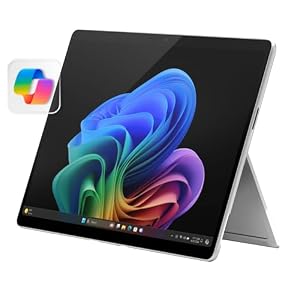
This 13-inch flagship combines performance and portability. It uses Qualcomm’s Snapdragon X Elite chip, delivering both speed and impressive efficiency.
The bright high-resolution screen is available with an OLED option, and battery life often exceeds a full workday. The magnesium body feels premium, and the kickstand allows flexible angles. Keyboards and pens are sold separately, so budget accordingly.
Professional Workhorse – Lenovo ThinkPad X12 Detachable Gen 2 – $$$
Aimed at business professionals, this 12.3-inch tablet comes with Intel’s Core Ultra processors and supports up to 32 GB of RAM.
The build quality is rugged and enterprise-ready, with a folio keyboard included. Security features such as fingerprint and face recognition are built in, and multiple USB-C ports provide good connectivity. The display is a sharp Full HD+ IPS panel suitable for office use.
Creative Powerhouse – Lenovo ThinkPad X13 2-in-1 Gen 5 (2024) – $$$
While the above ThinkPad X12 Detachable Gen 2 is built as a lightweight tablet-first device with a folio keyboard, the ThinkPad X13 2-in-1 Gen 5 is a sturdier convertible laptop-tablet hybrid designed for heavier creative and professional workloads.
It delivers workstation power in a convertible form for those who need performance and flexibility. Its Intel Core Ultra processors, paired with up to 32 GB of RAM and 1 TB of SSD storage, provide the speed and multitasking headroom required for demanding creative tasks such as digital art, large-format photo editing, and complex design projects.
The 13.3-inch IPS touchscreen offers a clear, color-accurate workspace while Thunderbolt 4, Wi-Fi 7, and strong security features make it a robust professional tool.
Budget-Friendly 2-in-1 – Microsoft Surface Go 4 (2023) – $
This 10.5-inch tablet is the affordable entry point to the Surface line. With an Intel N200 processor and 8 GB RAM, it handles browsing, streaming, and Office tasks reliably. Battery life reaches eight to ten hours.
It includes a microSD slot and headphone jack, features often missing on pricier models. The compact size and low weight make it very portable. The keyboard and pen are optional extras.