Ice Makers
 Chairs
 Kettles
 Projectors
 Air Purifiers
 Dash Cams
 Headphones
 Smartwatches
 Blenders
 Humidifiers


Shop Online Safely in 2026: Your Guide to Avoiding Scams
People often assume they’d never fall for an online shopping scam, but the reality is that these scams are becoming as widespread as they are successful. In 2025, around 1 in 3 American adults said they bought an item that never arrived, was counterfeit, or wasn’t refunded.
Generative-AI-enabled scams are also rising. TRM Lab reports these scams grew 456% between May 2024 and April 2025. As AI scams grow more sophisticated and widespread, understanding common red flags is becoming increasingly important.
This guide outlines the most common online shopping scams, including AI-generated scams, and shares common red flags and ways to build safer digital habits.
Why Online Shopping Scams Work
Heuristics — mental short-cuts the brain takes to make quick daily decisions — are a common reason people fall for scams. For instance, many shoppers have had good experiences after reading product reviews, and have learned to trust them and similar forms of social proof. Scammers exploit this trust by including fake reviews on their sites.
Scammers also know how to exploit our cognitive biases. An example of this is optimism bias, which is a tendency to believe that you’re more likely to experience good things than bad things. Optimism bias can lead a person to overestimate the chance that a tempting, too-good-to-be-true offer will turn out well, and to underestimate the chance that it’s a scam.
Additionally, research shows that our brains release a series of feel-good hormones like dopamine when we shop. Scammers take advantage of this by impersonating trusted brands, and creating urgency and scarcity to get you to buy impulsively.
Urgency and Scarcity Tactics
Scammers try to create a sense of FOMO (fear of missing out) or urgency by making a product appear scarce or special, or offering a time-limited discount. They employ tactics such as “closing down” sales, unrealistic discounts with timer countdowns, and low-stock alerts that convince you to purchase impulsively.
And these strategies work. According to a 2025 e-commerce report, 70% of shoppers said that when offered a discount, they bought things they normally wouldn’t, a trend consistent across age groups.
Fake Trust Signals
Some online shopping scams are designed to trick shoppers into thinking they’re dealing with a real, established brand. An example of this is brand impersonation — when scammers pretend to be a real business by copying websites, apps, social media accounts, or emails to steal shoppers’ data or money.
A Menlo Security report found that just over half of browser-based phishing attempts in 2024 involved some form of brand impersonation. Apart from fake websites or apps, scammers also use:
- Fake photos: Convincing images, whether plagiarized or generated by AI, designed to make low-quality products or nonexistent products appear real.
- Fake social proof: User reviews and endorsement videos can be easily created to give the impression that a product is well-liked.
- Fake secure checkout: Payment badges like PayPal, Visa, and Mastercard are shown on checkout pages to convince shoppers their payment is “secure,” but these images aren’t linked to any supporting web content.

Payment badges from a scam website (originally reviewed by MalwareTips.com)
You also need to watch out for fake checkout forms. In this scam, hackers hijack a genuine online store by overlaying a modal (usually a pop-up) over the payment page. When a user submits their card details, the malicious modal displays an error and redirects them back to the legitimate payment page, and the user has no idea that hackers have now captured their data.
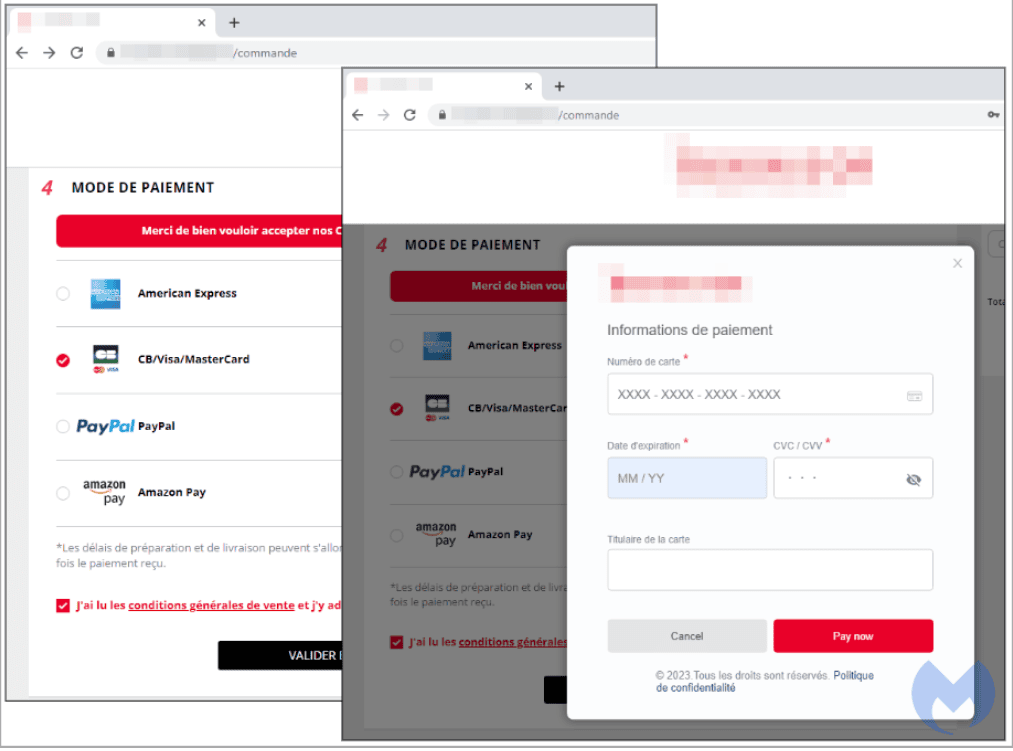
An example of a malicious modal overlaid (source: Malwarebytes)
Seasonal Scam Spikes
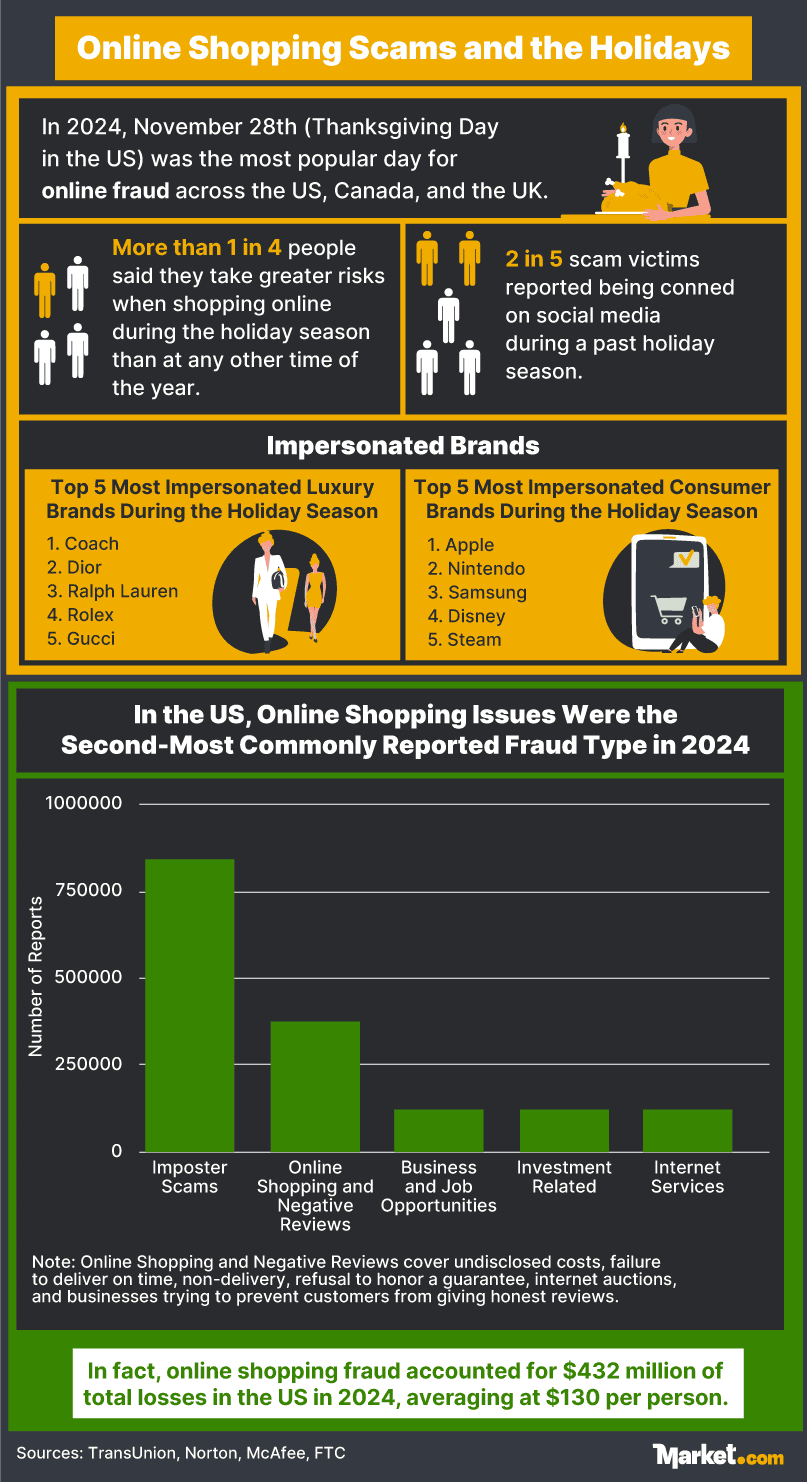
More people shop online during the holiday season, which runs from October through December, and online scams also tend to spike during this period. In November 2025, CloudSEK, an AI-based threat management solution, discovered over 2000 fake holiday-themed stores, including sites mimicking brand names such as Amazon and Apple.
Meanwhile, fraud prevention platform SEON reported that fraud charges increased five-fold on Black Friday, and four-fold on Cyber Monday compared to a baseline level in October 2024. Additionally, a report by TransUnion found that attempted online fraud peaked on November 28th in that year — Thanksgiving Day in the US.
Tips to Avoid Online Shopping Scams
To avoid online shopping scams and common fallacies like optimism bias, you can follow a few simple best practices, which we cover in the following sections.
Make Sure the Website Is Legit
Scammers create convincing copies of websites from real brands to steal your card details, passwords, and personal information. They might also set up fake e-commerce stores that sell products from trusted brands.
The following table outlines red flags to watch out for, but remember that not every sign automatically means the site is fake. A red flag means you should verify the site is legit before submitting your details or making a purchase.
Signs That a Website May Be Fake
*Examples given are for illustration purposes only
Additionally, run a domain lookup to determine the date the domain was created. A recently created site may be another red flag. You can also use a third-party tool like ScamAdviser to assess the risk of a website being a scam.
Verify the Business or Marketplace Seller
Check if the business is legitimate by searching for the company name, verifying its physical address, and confirming that its phone number works. Look through its social media accounts too. Warning signs include a high follower count with little content, low post engagement, or comment sections filled with generic remarks.
If you’re dealing with a seller on a marketplace, assess the seller’s profile by considering:
- Trusted Seller Badges: Marketplaces like Amazon, eBay, and Etsy hand out endorsements to trusted sellers.
- Seller Details: Real sellers typically provide a lot of information about themselves, including contact details, shipping and return policies, and customer support.
- Sale History: Look for a long track record of sales and be wary of new accounts, especially if the seller is giving a massive discount or selling expensive items.
- Customer Reviews: Look for consistent positive reviews.
- Websites and Social Media Presence: Real sellers tend to have websites and social media accounts with relevant content, high-quality images, and consistent branding.
Check for Fake Shopping Apps
Reputable app platforms have measures to remove malicious apps, but some still enter the market. These tips can help you spot a fake app:
- Check that the publisher’s name matches what reputable sources are reporting online
- Look at the number of downloads — established apps will have many downloads
- Read user reviews and be wary of apps with few, generic, or repetitive reviews
- Read the app description and look for typos and poorly written text
- Scrutinize permission notifications; fake apps ask for more unnecessary permissions, such as for your camera and microphone
Be Careful with “Too-Good-to-Be-True” Deals
If you come across an unfamiliar business offering heavy discounts or advertising a “closing soon” sale, pause and ask yourself if the price is actually bait. Deals that look too good to be true might very well be.
A common red flag is luxury brand items. Designer clothes and handbags sold in the hundreds are likely second-hand, counterfeit, or don’t exist at all. A quick price comparison and business background check could save you money and protect your personal information from scammers.
Look for Signs of a Fake Product
Fake products may feature poor-resolution images or photos that look copied from other websites. Furthermore, genuine sellers often provide multiple images showcasing the product from different angles, so a product with just one or two front-angled shots may also be a red flag.
Be mindful of AI-generated images, too. Signs include inconsistent texture, odd lighting and shadow patterns, and edges that seem to blur out. However, some genuine sellers also use AI images, so don’t rely on this indicator alone.
Watch Out for Fake Reviews
Customer reviews are easy to fabricate, so compare feedback from several sources instead of just the website. These are signs of fake reviews:
- Several reviews using repetitive language that are overly positive or generic
- Positive reviews that were posted recently within a short period
- Reviewers without profile pictures or any details
- Generic reviews that are missing details of the product
- The absence of negative reviews
Note that a business or product can still be legitimate even if several reviews appear fake as part of its marketing strategy. Moreover, genuine customers may be using AI to write their reviews.
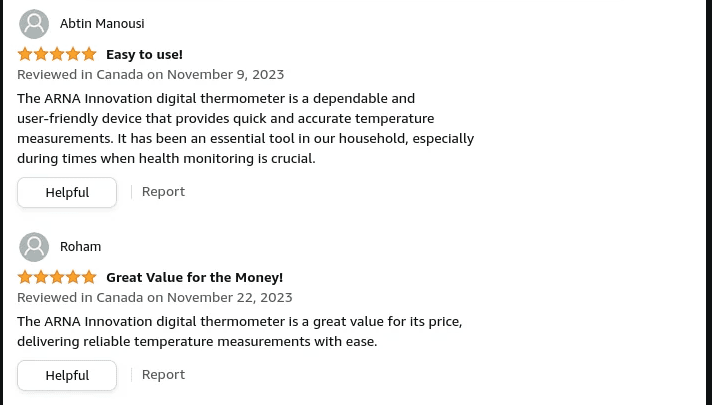
Example of fake reviews (source: Reddit)
Avoid Creating a Customer Account
Don’t create a customer account with a company you’re unfamiliar with. For extra precaution, avoid storing card details and sharing unnecessary personal data, even with trusted businesses, because data breaches can happen. Scammers can use your data for identity theft, so share the bare minimum needed to shop.
Examine the Refund and Return Policy
A shop’s refund and return policy could also hold clues that it’s a scam. Read the policy and watch out for vague or complicated terms, missing return addresses, and limited refund and return options.
Authentic stores also need to comply with consumer laws. In the US, the Federal Trade Commission (FTC) requires sellers to ship items within at least 30 days and offer a full refund, not store credit or a gift card, if they didn’t send your order. However, sale items may come with different terms and conditions.
Use Safe Payment Methods
Opt for credit cards whenever possible, as they offer better fraud protection than debit cards. In the US, the Fair Credit Billing Act protects credit card owners from charges that are:
- Fraudulent
- Incorrectly billed
- Linked to goods that never arrived or were vastly different from descriptions
Secure payment gateways, such as PayPal, Apple Pay, and Google Pay, and official buy now pay later (BNPL) solutions can also add another layer of protection. To stay safe, avoid businesses that only accept cryptocurrency (without also accepting other valid forms of payment), or that ask for wire or bank transfers or gift cards. These payment methods offer little chance of recovering your money if the company is a scam.
Slow Down and Double-Check Before Paying
Scammers often try to trigger emotions like fear or excitement to get you to buy or pay quickly. For example, a massive 24-hour discount may lead to impulse purchases, while a fake message about a parcel being stuck in customs might spark panic. These tactics can catch you off guard; learning to pause and reflect before deciding can save you from getting conned.
Another tip is to schedule a time when you’re not distracted to shop online. Once you’re confident a business is genuine and ready to buy, double-check the payment page’s URL, confirm the business details, and ensure the final amount is correct before paying.
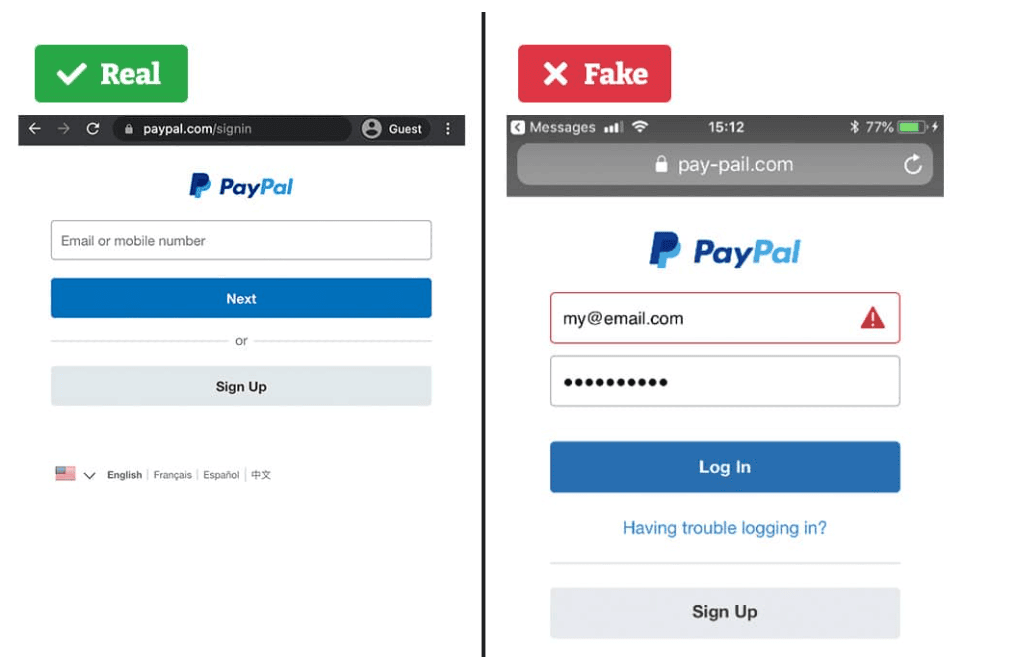
An example of a fake payment gateway page (source: Verified)
Don’t Click Links in Unsolicited Emails or Text Messages
As well as fake websites and listings, scammers also use emails and text messages to trick shoppers. One commonly reported method is a text sent by a scammer regarding a delivery issue. Another is a phishing email that mimics a trusted brand’s email but is sent by a scammer to get you to reveal your login and card details.
These scam texts and emails may contain these red flags:
- Urgent language to get you to do something (e.g., “act now”)
- Request for personal data such as card details
- A link to an unknown site
- A phone number to help resolve your “issue”
Never click links in unsolicited emails or texts. Go directly to official channels or contact customer support yourself for any enquiries or issues.
Shop on Secure Devices and Networks
Stay cybersafe by keeping your browsers and devices up to date with the latest security patches and enabling antivirus software, which can flag suspicious websites, links, and email attachments. And as a rule of thumb, avoid making online purchases or entering card details when on a public hotspot, as the network might be compromised.
Monitor Your Bank Statements
Scammers may make small charges to your card, usually a few cents or dollars, to avoid attention and ensure the card works. They might then sell the card on the black market or use it themselves for a larger purchase.
Your best bet is to monitor your statements regularly and set up alerts for large purchases, withdrawals, and low balances. You’ll then be able to dispute charges promptly and recover losses faster.
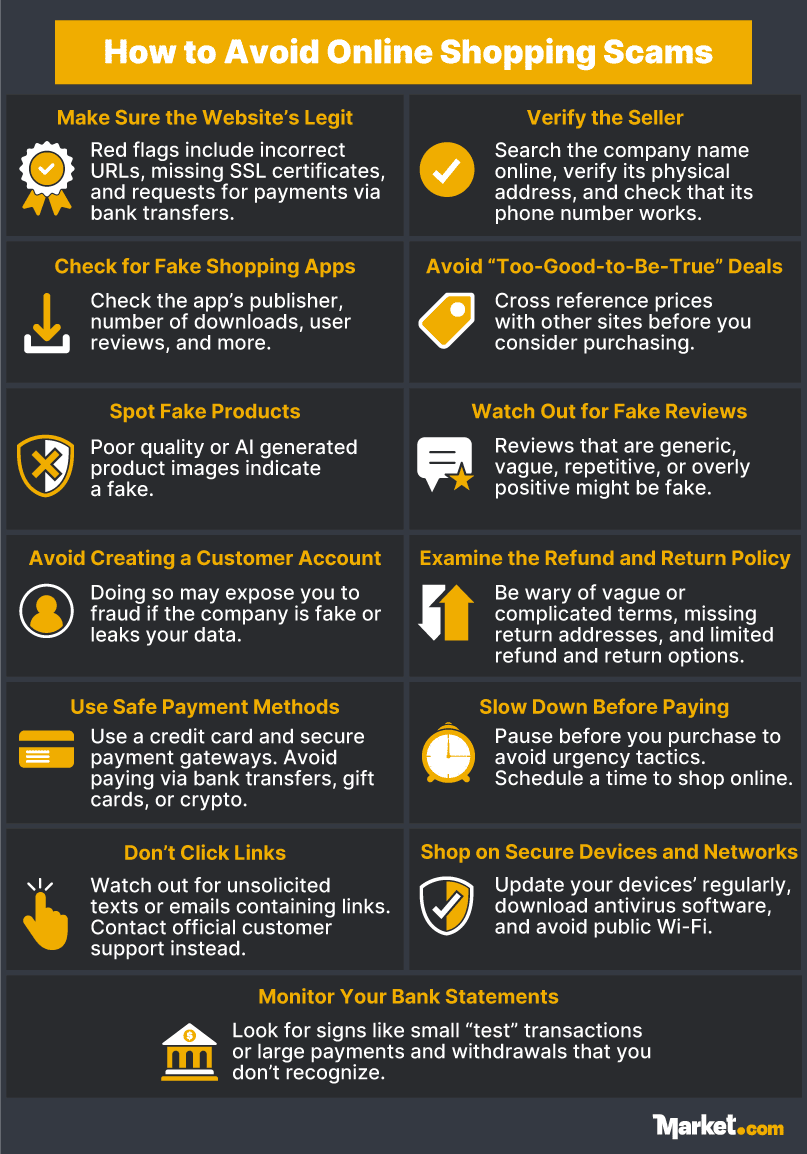
Emerging AI-Powered Shopping Scams
AI can clone a voice in seconds, and scam software can cost as little as $20, making it easier than ever for scammers to create an elaborate con. They can spoof websites and generate deepfake ads, customer reviews, and customer support chatbots quickly using AI tools.
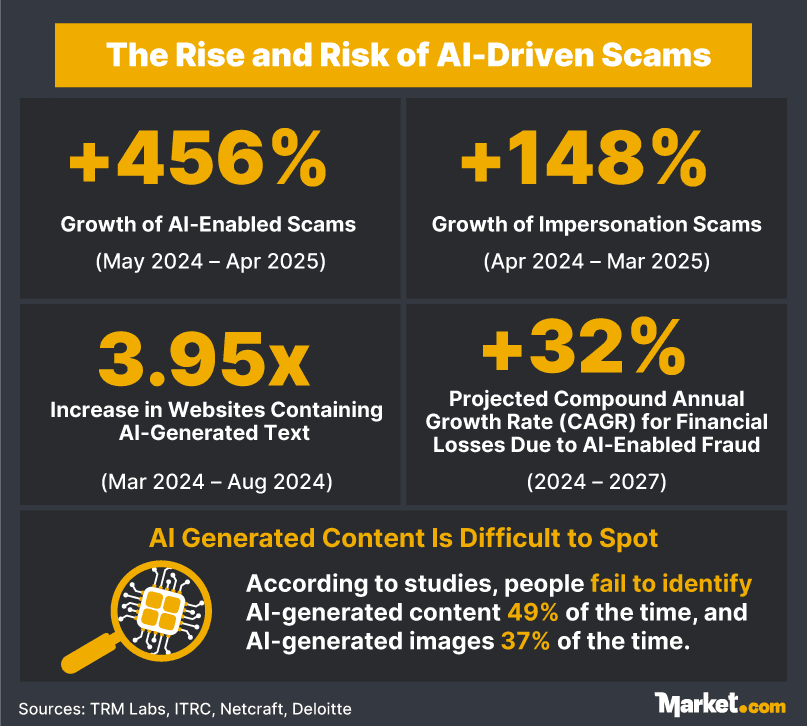
The rise in AI‑powered scams makes it even harder for people to tell the difference between what’s real and what’s fake. Several studies have shown that people struggle to identify AI-generated content. For example, one study found that participants could differentiate between AI-generated text and human-written text only 51% of the time — odds that are as good as a coin toss.
DeepFake Ads and Endorsements
Fraudsters are creating deepfake (realistic, fake media using deep learning) ads featuring celebrity endorsements and reviews. These ads often appear on social media, sending shoppers to scam sites where they might unknowingly purchase a fake or counterfeit product or reveal their personal data.

Screenshot of a deepfake video ad of Taylor Swift endorsing cookware (source: CBS)
These are signs that you may be watching a deepfake video:
- Odd or inconsistent skin lighting or shadow patterns
- Strange eye movements or irregular blinking
- Blurry or warped facial features
- Lip movement that’s out of sync with speech
- Unnatural emotional reactions
- Changing details (e.g., earrings that appear smaller when the wearer moves their head)
- Blurry, warped, or changing background details
AI-Generated Fake Reviews
Fake reviews can mislead shoppers into trusting dodgy sellers, and AI can generate many seemingly genuine reviews in seconds.
Be wary of product reviews with these red flags:
- An overuse of em-dashes (—) or ellipses (…)
- Multiple reviews rehashing the same points using different words
- Long, well-structured reviews with generic phrases and cliches
- Tone that’s too professional or too casual
- Overly dramatic language, such as a heavy use of exclamation points
AI-Generated Impostor Websites
AI enables scammers to mimic e-commerce sites of well-known brands, complete with polished images and professionally written text for product descriptions, reviews, and emails. Scammers also use a method called domain spoofing to create URLs that are similar to legitimate sites, with only one minor difference, such as an additional letter or hyphen.
Watch out for signs of an AI-generated impostor store:
- The store’s URL contains a typo, an extra hyphen or word, or an unusual top-level domain (e.g., .top)
- Images with inconsistent texture, odd details, or areas that blur out at the edges
- Videos with inconsistent details and unnatural facial expressions
- Vague or generic product reviews
- Massive discounts that you can’t find elsewhere
- Missing or incomplete company details, privacy policy, or terms and conditions.
Don’t trust sponsored or ad links from search engines, as scammers can also advertise their shops online. To help you stay safe, use antivirus programs with anti-phishing tools to detect fake sites, and choose software with regular updates that can identify the latest scams.
But also be aware that even these aren’t foolproof — a recently released virus might not have been logged in the software’s database, for example. Even with the best tools available, you still need to be diligent and do your due diligence to verify a site’s trustworthiness.
Buy Now, Pay Later (BNPL) Scams
BNPL services may be a flexible payment option, but be wary of scams that come in different forms, including:
- Account takeover: Hackers take control of a BNPL account.
- Fake BNPL offers: Scammers create too-good-to-be-true offers to steal credit card or bank details.
- Identity theft: Scammers use stolen personal data to open a BNPL account.
According to cybersecurity company Critical Start, BNPL fraud is common, with some retailers reporting fraud rates of up to six times more than credit card fraud. Here’s how to avoid BNPL scams:
- Only use official BNPL websites and apps
- Ignore too-good-to-be-true BNPL offers
- Never give BNPL providers passwords and one-time pins (OTPs)
- Monitor your BNPL statements and report suspicious transactions
- Enable 2FA for your BNPL account
Fake Chatbots
AI chatbots are becoming standard on websites and apps, but many people don’t realize hackers can create impostor chatbots pretending to be from your bank or a trusted retail brand to steal your personal data or infect your device with malware.
To protect yourself from malicious AI chatbots:
- Avoid clicking links from suspicious emails and messages
- Go straight to official channels to access customer support chatbots
- Don’t share personal data like login and card details in the chatroom
- Check that links included in the chat are from official channels
- Watch out for urgent language like “Click now to avoid account suspension”
Fake Customer Support Numbers in AI Results
A new fraud scheme involves scammers inserting scam numbers in large language model (LLM) systems, thus ending up in AI results such as Google’s AI Overview and Perplexity. People searching for customer support numbers using AI tools may end up speaking with scammers instead of legitimate customer representatives.
Heed these warning signs of a scam customer-support line:
- The customer rep doesn’t verify your customer information to ensure they’re talking to the right person
- Payment requests using bank transfer, gift cards, or cryptocurrency
- Pressure tactics to get you to pay or share login or card details
- Requests to allow remote access to your devices without a valid reason
Hang up if you feel something is off during the interaction. As a precaution, don’t trust customer support numbers from AI results and go straight to the official website for all issues.
What to Do If You Fall for a Scam
If you do fall for an online shopping scam, try to stay calm. Taking the right steps, while acting quickly and decisively, can improve your chances of recovering your losses and help authorities catch the perpetrators. Whether you’ve lost money or your personal data has been compromised, these are the next steps to take.
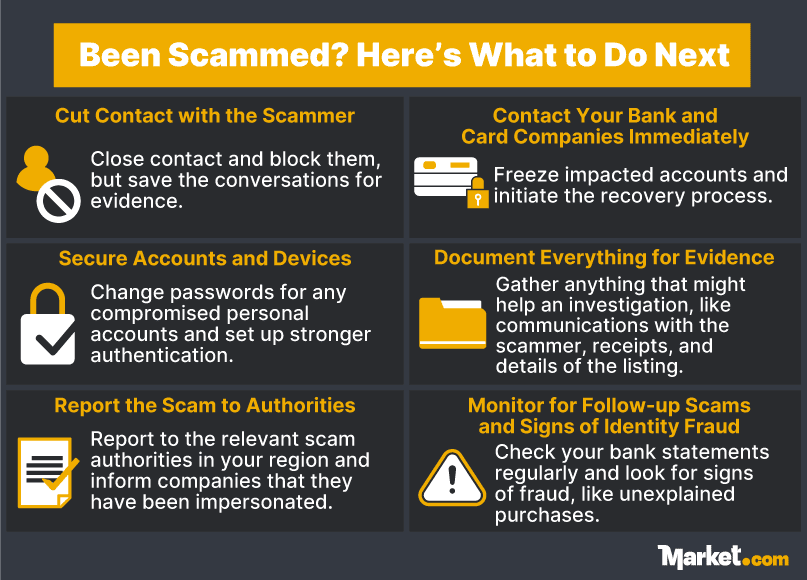
Cut Off Contact with the Scammer
Cease all contact with the scammer and block them, but save all conversations for evidence. If you’ve given them remote access to your phone or laptop, remove their access.
Contact Your Bank and Card Companies Immediately
For each affected account, call the bank or card provider immediately to freeze your account and initiate the recovery process. However, keep in mind that you may not be able to recover all your money.
What to Do After You’ve Lost Money in an Online Shopping Scam
Secure All Affected Accounts and Devices
If a scammer has your card details, personal information, or login details for any accounts, you’ll need to change the passwords. Use a strong password that’s at least 12 characters long, using a combination of upper case and lowercase letters, numbers, and symbols. Start updating the most sensitive account first, and then set up 2FA for stronger security.
If a scammer has gained access to your phone or computer, change the password, run a malware scan, and make sure your device is updated with the latest security release. Inform your friends and family as well, since scammers may use the information found on your device to target your contacts.
Document Everything for Evidence
Gather all evidence of the scam to help the investigation and recovery. These are items you should keep:
- Letters, emails, and chats with the scammer
- Receipts and any proof of payment
- Bank statements
- Bookmarks of the suspected website, product listing, and company profile
- Any evidence that can help identify the scammer or company
Report the Online Scam to Authorities
If you’ve been dealing with a shady seller through a legitimate shopping platform, such as Amazon or Etsy, report the suspected scammer to the platform. If the scammer was pretending to be a legitimate employee of a brand, call the company directly to verify and report the matter.
Report the online shopping scam to the relevant authorities. These are your options depending on where you live:
- US: File a complaint with the Federal Trade Commission (FTC) and report fraud to the Internet Crime Complaint Center. You can also report international scams to Econsumer. If you’re unsure of what to do, use this government resource.
- Canada: Report to the Canadian Anti-Fraud Centre (CAFC) and forward spam text to 7726 (SPAM). You can also report misleading marketing practices to the Competition Bureau.
- UK: File an online report to the police and also the Citizen’s Advice.
- EU: Find your country’s scam reporting bureau at Europol or go to your local police if your country lacks a national resource.
Monitor for Follow-up Scams and Signs of Identity Fraud
Monitor for follow-up scams by keeping an eye on suspicious messages and emails. Additionally, check your statements regularly for any unauthorized activity, as fraudsters can use stolen personal data for identity fraud.
Report to IdentityTheft.gov if you suspect that identity theft has occurred. Here are warning signs of identity fraud:
- Unexplained invoices, withdrawals, and charges
- Unexplained login verification emails
- Calls from debt collectors about debts that aren’t yours
- Checks bouncing or cards being declined
- Rejected medical insurance claims because you’ve reached your limit, even though you didn’t use the service
- Notifications from the IRS about an unknown income source or tax return
- Notifications of new cards or loans under your name
- An unexplained drop in your credit score
- Mail or bills that stop arriving without a reason
Conclusion
Shopping scam tactics are constantly evolving, and anyone using digital media needs to exercise caution. To avoid scams, learn to recognize the signs of fake stores and bogus products, use secure payment methods, and stay away from unrealistic deals. Using secure devices and enabling 2FA for your financial accounts will also help tighten security.
Especially as AI continues to be developed, scams using the technology will increase in number and sophistication. Being skeptical of online content — and mindful of the tell-tale signs of AI-generated images, videos, and audio — can help you stay safe.
If you do get conned, stay calm and report the fraud to the relevant authorities. Call your bank or credit card provider to prevent further financial loss. Change your passwords for all compromised accounts and monitor for signs of identity fraud or a follow-up scam.
By cultivating good digital habits, you can shop online with confidence.