
 Ice Makers
 Chairs
 Kettles
 Projectors
 Air Purifiers
 Dash Cams
 Headphones
 Smartwatches
 Blenders
 Humidifiers









Foldable tablets are at the forefront of mobile design, offering both the convenience of a phone and the workspace of a tablet. Their flexible OLED screens and engineered hinges let you switch between a compact, phone-sized device and a larger workspace whenever you want.
This guide explains what makes foldable tablets unique, which specifications matter most, and how to choose the right one for your needs. For more general guidance on Tablets, see our complete tablet buyer’s guide.
Which Foldable Tablet Should You Buy?
-
For productivity and multitasking: Look for a large, squarer display, at least 12GB of RAM, and a current flagship or laptop-class processor. A 120Hz refresh rate and strong battery life make long work sessions more comfortable.
-
For note-taking and reading: Prioritize a sharp (Full HD+ or higher) display with 120Hz for smoother scrolling and stylus input. A sturdy hinge and good palm rejection support matter more than raw processing power.
-
For media and streaming: Focus on OLED for better contrast, strong brightness levels, and a wider aspect ratio. Storage capacity is important if you download content for offline viewing.
-
For gaming and creative work: Choose the most powerful processor available, 12–16GB of RAM, and ample internal storage. A high refresh rate improves responsiveness, especially for fast-paced games.
-
For travel and portability: Pay attention to hinge durability, overall weight, and real-world battery life. Fast charging is helpful, but battery endurance matters more.
-
If you plan to keep it for years: Don’t skimp on RAM or processor quality. Since storage is rarely expandable, consider buying more capacity upfront.
Unique Features of Foldable Tablets
Foldable tablets stand apart from standard tablets not just in form factor, but in how they are designed to be used. Below are some of the features that define foldable tablets.
Flexible Display Technology
The defining element is a foldable OLED display, often reinforced with Ultra Thin Glass (UTG) layered under protective coatings. UTG feels like glass yet can bend repeatedly without shattering. Early models relied on plastic-only screens, which scratched easily and felt soft. Modern UTG-based displays provide better durability, and a smoother touch, and are better at resisting everyday wear. You gain the benefit of a large, vivid display that folds down to fit in a pocket or a small bag.
What To Look For:
- UTG or equivalent reinforced glass layers
- High peak brightness for outdoor use
- Scratch-resistant coatings
What To Avoid:
- Plastic-only displays without glass reinforcement
- Low-brightness panels that struggle outdoors
Hinge Mechanism and Design
When you’re comparing foldable tablets, the hinge deserves more attention than almost any other feature. It’s the part you’ll use every single day, and it’s also the part most likely to wear out over time.
Start by thinking about how the tablet folds.
- Most models close inward like a book, which protects the main display when it’s shut. That’s usually the safer choice if you’re tossing it into a bag and plan on carrying it around often.
- Some designs fold outward, leaving the screen exposed but skipping the need for a separate cover display. That can feel more seamless in daily use, but it also means the screen is more vulnerable to scratches and drops.
If possible, try opening and closing the device in person. It should feel smooth and stable, not loose, wobbly, or uneven.
You’ll often see brands claim their hinges are tested for 200,000 folds or more. In practical terms, that’s several years of frequent daily use. It’s a helpful benchmark, but not the only one that counts. Real-world conditions matter too. Dust and debris can collect around the hinge over time, especially if you use the tablet outdoors or carry it in a crowded bag. If durability is a priority, look for designs that advertise improved sealing or debris resistance.
Visible Crease
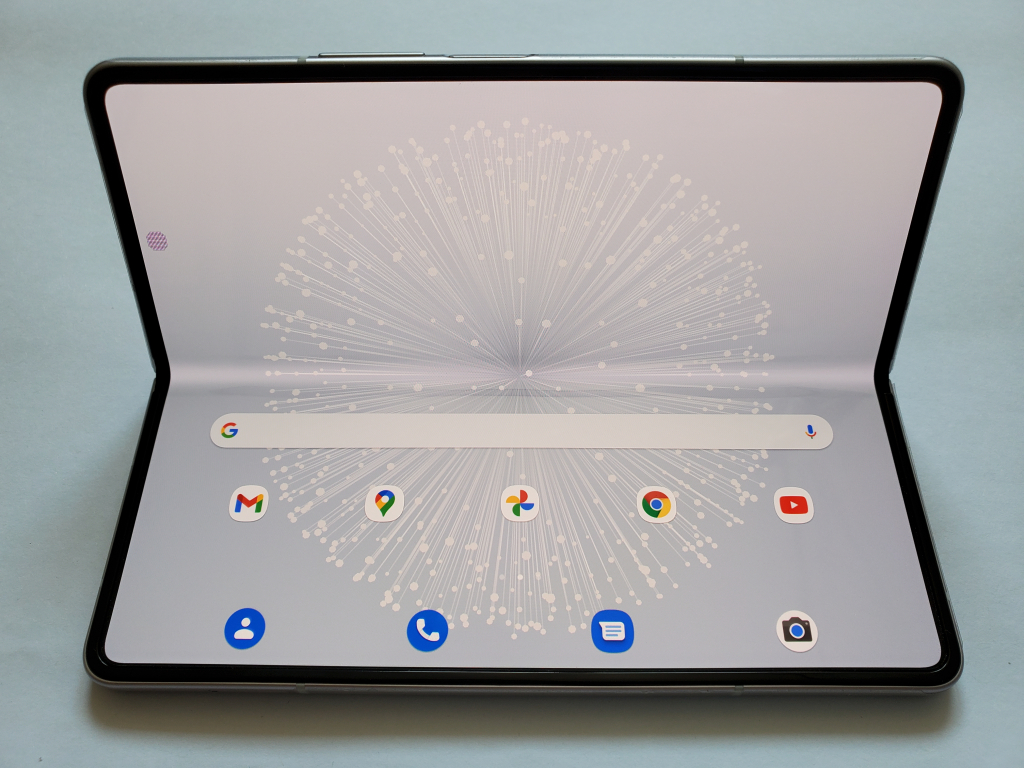
Every foldable display shows a crease where the screen bends. Some designs hide it better than others, but it usually fades from notice during everyday use. It’s most visible at certain angles or when the screen is off. During normal use – reading, watching video, or multitasking – most users stop noticing it entirely.
Modern “waterdrop” hinges let the screen curve more gently, resulting in a shallower, less reflective crease. While not fully removable, a less obvious crease adds to the premium feel.
Multi-Mode Versatility
Foldable tablets are designed to work in multiple physical configurations:
- Fully open: Functions like a compact tablet for reading, video, gaming, and split-screen multitasking
- Partially folded: Acts like a mini laptop for typing, video calls, or desk use
- Closed: Operates like a large smartphone, often with a separate cover display
Foldables are especially useful for users who want one device to cover work, entertainment, and casual daily use
Under-Display Cameras and Software Optimization
To maximize screen space, some foldables hide front cameras beneath the display. While the image quality is not as sharp as traditional selfie cameras, these under-display lenses work well enough for video calls and basic photos.
More importantly, foldables rely heavily on software optimization. Well-designed models support features like:
- Split-screen and multi-window layouts
- App continuity between the cover and the main displays
- Taskbar-style navigation for faster multitasking
These software features often matter more than hardware specs when it comes to real productivity gains.
Key Specs & Features Explained
Because foldable tablets combine phone and tablet roles, some specifications matter more here than they would on a standard device.
Display Quality and Refresh Rate
The display is the main reason to buy a foldable tablet, so this is not the place to compromise.
- Start with resolution. On a larger folding screen, at least Full HD+ is the baseline for crisp text and clean visuals. If you read a lot, work with documents, or care about sharp detail, stepping up to QHD makes text and images look noticeably more refined.
- Panel type matters too. OLED screens generally offer deeper contrast and more vibrant colors than LCD, which improves everything from streaming to photo editing. Blacks look truly black, and overall image quality feels richer.
- Refresh rate affects how the tablet feels, not just how it looks. A 90Hz or 120Hz display makes scrolling smoother and stylus input more responsive, which you’ll notice immediately in everyday use. Lower refresh rates can feel slightly choppier, especially on a large screen.
- Aspect ratio is the final piece. Squarer displays are better suited for documents, web browsing, and multitasking side by side. Wider panels feel more natural for movies and TV.
Weight and Thickness
Foldable tablets are thicker and heavier than traditional tablets when closed. This is a natural trade-off of having two screen layers and a hinge, but the difference is noticeable in everyday use.
Lighter, thinner models are easier to hold for long reading sessions and more comfortable to carry in a pocket or bag. Heavier foldables can feel top-heavy when used one-handed, especially in phone mode.
What To Look For:
- Even weight distribution when folded and unfolded
- A closed thickness that still fits comfortably in a pocket or small bag
- Rounded edges or matte finishes that improve grip
What To Avoid:
- Very thick folded designs that feel bulky in daily use
- Heavy models if you plan to hold the device for long periods
- Sharp edges that make one-handed use uncomfortable
Weight and thickness don’t affect performance, but they strongly influence how often you’ll enjoy using the device.
Processor and Performance
Most foldable tablets run on either flagship mobile chips or laptop-class processors. On paper, both sound powerful, but the difference shows up in how you actually use the device.
For everyday tasks like browsing, streaming, note-taking, and light multitasking, a recent flagship mobile processor is more than enough. Apps open quickly, animations stay smooth, and split-screen use feels responsive. If this is your primary use case, you don’t need the absolute top-tier chip, but you should avoid older or midrange processors that may struggle with multiple apps on a large display.
If you plan to game, edit photos or video, or use demanding creative apps, processor quality becomes much more noticeable. A stronger chip means steadier frame rates in games, faster rendering in creative tools, and less lag when working with large files. It also tends to handle external displays, keyboards, and desktop-style modes more reliably.
For productivity-focused users, especially those treating a foldable as a laptop replacement, laptop-class chips or the latest flagship processors offer better long-term stability. They’re more likely to stay smooth through major software updates and heavier multitasking over time.
Memory (RAM)
A foldable tablet gives you room to do more at once, but that extra space only pays off if the device has enough memory to keep up.
Think of RAM as your multitasking headroom. With 8GB, most people can browse, stream, check email, and run two apps side by side without major issues. It’s a workable starting point, especially for lighter use.
If you regularly split the screen, use floating windows, or jump between several apps throughout the day, 12GB to 16GB makes a noticeable difference. App switching feels faster, background apps stay open longer, and the experience is more stable under heavier workloads. It also gives you more breathing room as apps and operating systems become more demanding over time.
When RAM is limited, the system closes background apps more aggressively. That leads to constant reloads when you switch back and forth, which breaks the flow of multitasking and undercuts the main advantage of a large folding display.
Battery Life
A larger folding display simply draws more power than a standard phone screen, so battery capacity matters more here than it does on a typical tablet or handset.
Most foldable tablets are designed to get you through a full workday, which usually translates to around 7 to 10 hours of active screen time. That’s realistic for mixed use, but your habits will influence the outcome. Running the screen at high brightness, keeping a 120Hz refresh rate enabled, gaming, or multitasking heavily will drain the battery faster than casual browsing or video playback.
If you plan to use the tablet outdoors, for travel, or as a laptop substitute, battery life becomes a key differentiator. Look beyond the marketing claim of “all-day use” and consider how you actually work. Long note-taking sessions, constant split-screen use, or extended video calls are more demanding than occasional media consumption.
Fast charging helps offset the larger battery draw, and many foldables support quick top-ups. That said, charging speeds can be slower than those of regular smartphones, especially if the device has a large battery to refill. In practical terms, you may get a solid boost in 30 minutes, but a full charge can still take longer than you’re used to.
Storage and Expandability
Foldable tablets typically start at 256GB of internal storage, with 512GB or higher available on more expensive configurations. Unlike some traditional tablets, expandable storage via microSD is rare. Slim designs and water resistance leave little room for extra slots, so what you buy is usually what you’re stuck with.
That makes your initial choice more important.
- If you mainly stream content and rely on cloud storage, 256GB can be sufficient for apps, updates, and everyday files.
- If you download large media libraries, store high-resolution photos and videos, or keep extensive offline documents, storage fills up faster than you might expect, especially with larger app sizes and system files.
Upgrading storage later is not practical on most foldables, so it’s worth thinking ahead rather than buying the base model to save money.
Connectivity and Accessories
Most foldables support 5G modern Wi-Fi standards, and Bluetooth accessories.
Stylus and keyboard support greatly expand utility, whether for note-taking, art, or laptop-like use. Some models include accessories, while others sell them separately – an important cost consideration.
Camera Quality
Cameras are not a main selling point for most foldable tablets. Even high-end models tend to prioritize display size and multitasking over photography.
Some premium foldables can produce photos on par with recent flagship phones, but results vary by model. If camera quality matters to you, it’s better to look at real photo samples and reviews rather than relying on spec sheets alone.
Price and Value
Foldable tablets are expensive compared to standard tablets. Phone-sized foldables typically cost more than high-end tablets, and larger foldable PCs are often priced closer to laptops.
The higher price comes from the folding display, hinge mechanism, and reinforced materials. Whether it’s worth paying depends on how often you’ll actually use the folding design.
If you plan to switch between phone-style and tablet-style use throughout the day, the added cost can make sense. If you mainly stream video, browse the web, or use a tablet at home, a conventional tablet usually offers better value for less money.
Spending a bit more upfront on storage or memory is often smarter than upgrading later, since most foldables don’t allow expansion.
Common Mistakes When Buying a Foldable Tablet
Foldable tablets offer unique advantages, but many buyers are disappointed due to mismatched expectations rather than hardware flaws.
Common mistakes to watch out for when buying a foldable tablet:
- Choosing based on screen size alone without considering software experience
- Underestimating how often the crease is touched or viewed during use
- Buying the lowest storage tier and running out of space quickly
- Assuming all apps scale well across folding screens
- Overpaying for accessories that add little real productivity
- Expecting foldable cameras to match the very best camera phones
Taking a few minutes to think about how you’ll actually use the device day to day makes it much easier to choose a model you’ll be happy with long term.
Recommended Picks Compared
Several foldables released in late 2024 and 2025 stand out:
- Samsung Galaxy Z Fold6 (July 2024): Refined hinge, bright AMOLED display, strong Snapdragon performance
- Samsung Galaxy Z Fold7 (July 2025): Thinner design, larger main display, improved efficiency
- Google Pixel 10 Pro Fold (2025): Rare IP68 dust and water resistance, strong cameras, clean software experience
- Lenovo ThinkPad X1 Fold 16″ (2024): Laptop-class foldable aimed at professional workflows