





































Finding the right tablet for a child involves more than comparing prices and screen sizes. Parents and gift-givers need a device that’s both engaging and safe. It should endure rough treatment while offering access to enriching content.
This guide outlines everything you need to know to confidently choose a kids’ tablet that suits your needs. For buying advice for all kinds of Tablets, see my general guide for buying tablets.
Unique Features of Kids’ Tablets
Children’s tablets differ from regular devices in several important ways. These differences are designed to match the behaviors, safety needs, and developmental stages of younger users.
Built-in Protection and Toughness
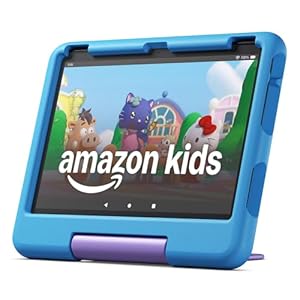
Most tablets for children arrive with a robust, impact-resistant case included. These cases are usually made from thick foam or rubber and often feature integrated handles or stands. Some models even go further with screens and ports that resist spills and scratches. Paired with stronger internal materials, these designs reduce the likelihood of breakage from everyday use.
Safety Controls for Peace of Mind
Parental control tools are essential for regulating how kids use their devices. The best tablets let adults set daily screen time limits, restrict access to certain apps, block inappropriate content, and create user-specific profiles.
These features are either built directly into the operating system or come through companion apps tailored for family use. This ensures kids stay within age-appropriate boundaries while using the device.
Age-Targeted Content and Layouts
Unlike general-purpose tablets that require users to hunt down apps and adjust settings, kids’ tablets often come preloaded with safe, educational, and entertaining content curated for specific age ranges. Some even include bundled subscriptions offering access to learning games, books, videos, and art programs.
The interface is simplified, with bright visuals, easy navigation, and features like voice search. This makes it ideal for young children who can’t yet read.
User Experience That Grows with the Child
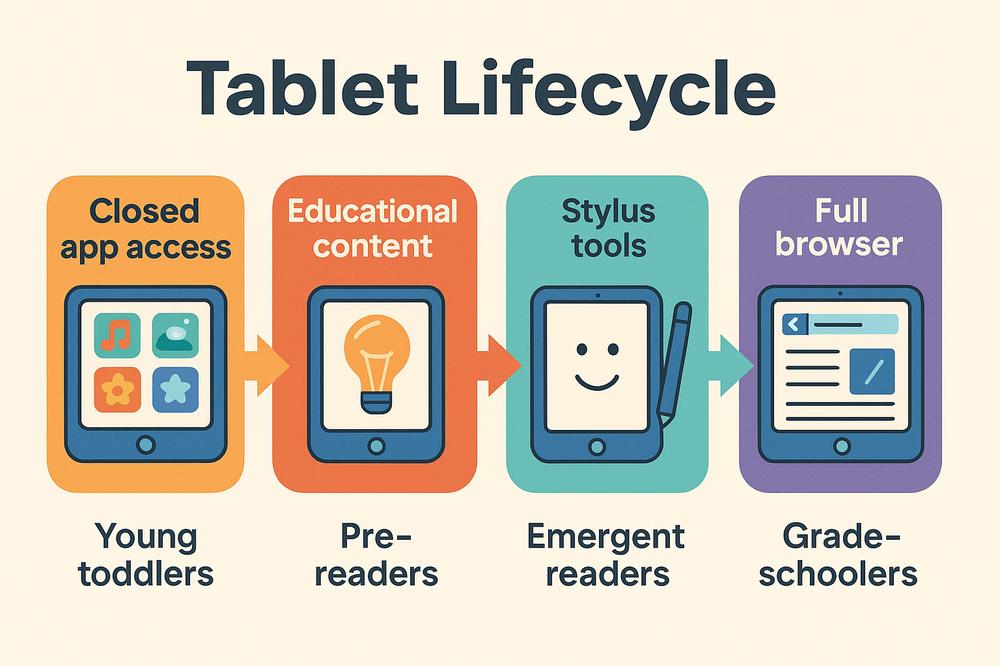
Certain models allow for different user profiles or adjustable settings that evolve with your child. Younger users may start with a closed, app-limited environment.
As they grow older, the tablet can be unlocked gradually to offer more mature features, broader content access, or even full browser support under adult supervision.
Short-Term Device vs. Long-Term Tool
Some tablets are designed solely for preschool and early elementary years. Others have the power and flexibility to serve older kids too. Choosing between a temporary starter device and a longer-lasting investment often depends on whether you prefer simplicity and safety now or want something that can eventually serve as a homework tool.
Key Specs & Features Explained
Understanding what to look for in a kids’ tablet helps you focus on what truly matters. This section breaks down the top-scoring features from Market.com’s evaluation system, offering both basic explanations and advanced insights.
Parental Controls
This is a non-negotiable feature for a kids’ tablet. You should be able to manage what your child sees, when they use the tablet, and which apps they can access. These tools are most effective when easy to navigate and customizable for multiple children of different ages.
Kid-Proof Case Included
A rugged case helps absorb shock from drops and prevents scratches. The best tablets include one in the box, often custom-fitted with bumpers, grip handles, and sometimes a built-in stand. If a device lacks one, you’ll need to buy a compatible case separately. That case may not provide the same level of protection.
Ruggedness
Aside from a protective case, the tablet itself should be built with durability in mind. That includes reinforced corners, tough display glass, and secure button placements. Some models go the extra mile with water or dust resistance, making them even more child-proof.
Display Quality in Kids’ Tablets
A tablet’s screen resolution and panel type play a huge role in overall user satisfaction. Higher-resolution screens such as Full HD or better provide crisp, clear visuals that enhance reading, games, and video playback.
Panels like IPS offer wide viewing angles and good brightness, which is helpful when multiple kids are watching or playing together. OLED screens are even richer in contrast but less common in this segment.
Battery Life of Kids’ Tablets
Children don’t always remember to recharge their devices, so extended battery life is a major plus. Look for tablets offering at least 8 to 10 hours of use on a single charge. Premium options often go beyond that, making them excellent for travel or long learning sessions.
Nice-to-Have Features
Warranty or Replacement Plans
Some brands offer generous warranties, sometimes even no-questions-asked replacements for damage. Others stick with standard one-year plans. A kid-specific warranty provides added confidence and is particularly useful for younger users prone to accidental drops.
Build Material Specific to Kids’ Tablets
Most kids’ tablets use plastic shells, which are lighter and safer for small children. Better-quality materials like dense plastic or light metal frames offer more resistance to wear over time. Though covered by cases most of the time, a sturdy build ensures the device lasts longer.
Refresh Rate
This measures how smoothly motion appears on the screen. A 60Hz refresh rate is standard. Tablets offering 90Hz or 120Hz deliver noticeably better animation and scrolling. While not essential for toddlers, smoother visuals make a difference in action games, videos, and learning apps.
Memory (RAM)
RAM allows the tablet to multitask and run apps smoothly. A minimum of 3 to 4 GB is sufficient for basic use. However, 6 to 8 GB ensures the tablet handles larger apps or future software updates better. More RAM generally means fewer freezes or delays.
Speakers & Audio Quality
Audio is important for content-heavy devices. Dual or stereo speakers provide clearer sound, especially in noisy environments or when multiple kids are watching together. While mono speakers can suffice, tablets with better audio components improve the overall experience.
Storage Capacity of Kids’ Tablets
Internal storage affects how many apps, videos, and games the device can hold. A minimum of 32 GB is usable. However, 64 GB or more provides more breathing room, especially if the tablet supports downloading content for offline use. Many Android and Amazon devices offer expandable storage via microSD cards, which adds flexibility.
Camera Quality
Front and rear cameras are used for video calls, photos, and sometimes educational activities. Image quality varies widely. Since children typically use cameras for fun or chats, even basic cameras are acceptable. High megapixel counts and video resolution aren’t major priorities here.
Accessory Compatibility
Some tablets allow connections to styluses or keyboards. If your child enjoys drawing or may use the tablet for schoolwork, stylus support or keyboard compatibility adds value. Most kids’ tablets don’t come with these accessories. However, premium or hybrid models might include them or support third-party add-ons.
Recommended Models
Here are three standout kids’ tablets currently available globally, each representing a different price and usage tier.
Premium Pick: Apple iPad (10th Gen)
This iPad isn’t specifically a kids’ tablet, but its performance and versatility make it a smart investment for families seeking a long-lasting device.
It features a large, vibrant screen and runs smoothly thanks to Apple’s powerful chipset. With access to the App Store, it supports a wide range of educational and creative tools. Apple’s built-in parental controls are comprehensive, though they require some setup time. An iPad as a child’s tablet is an attractive option for those already in the Apple ecosystem.
A rugged case is necessary for young children but not included. While priced higher than most dedicated kids’ tablets, its longevity and quality justify the investment for those looking to support both entertainment and learning through the years.
Ideal For: Families looking for a device that grows with the child and can also serve adult users when needed.
Versatile Pick: Samsung Galaxy Tab A9+ Kids Edition
This tablet combines Samsung’s standard A9+ hardware with child-focused accessories and software. It includes a durable case, kid-friendly styluses, and a secure child interface.
The screen is bright with a higher refresh rate, and performance is reliable for everyday use. It operates on Android and supports apps through the Google Play Store, offering broader compatibility than closed systems.
Samsung’s parental controls and learning tools are intuitive and adjustable.
Ideal For: Parents seeking an Android device that balances education, creativity, and entertainment.
Budget Pick: Amazon Fire HD 8 Kids (2024)
Amazon’s compact kids’ tablet is an affordable option that checks all the major boxes. It comes with a thick protective case, strong parental controls, and a year of access to Amazon’s curated child-friendly content.
The screen, while not full HD, is decent for its size. Performance is basic but adequate for preschool and early elementary apps. Storage can be expanded, and the included warranty allows for easy replacement in case of damage. It’s an excellent introduction to digital learning tools at a manageable price.
Ideal For: Young children and parents who want a turn-key, worry-free tablet experience.
Recommended Picks Compared
Here’s how the recommended tablets compare across essential features:
- Parental Controls: All three options offer comprehensive tools for monitoring and restricting usage.
- Case Inclusion: Only the Samsung and Amazon models come with a protective case included.
- Battery Life: All models support full-day use, with the Samsung slightly ahead.
- Performance: The Apple iPad leads in processing power and multitasking.
- Storage & Expandability: Amazon and Samsung allow for external storage via microSD card. iPad does not.
- Price Tiers: Amazon’s option is the most affordable. Samsung balances value and performance. Apple commands a premium price but offers unmatched versatility.