Modern office work places continuous demands on the hands and arms. Extended typing combined with frequent mouse use can lead to discomfort in the wrists, forearms, shoulders, and neck. These issues often stem from a combination of posture, workstation setup, workload, and individual health factors.
Ergonomic keyboards aim to reduce physical stress during typing by encouraging more neutral joint positions. This guide explains how ergonomic keyboards work, the types available, and how they may help reduce strain during prolonged computer use.
What Is an Ergonomic Keyboard?
An ergonomic keyboard reduces typing strain by altering the shape, angle, spacing, or adjustability of the keys and casing. The primary goal is to keep the wrists and forearms closer to neutral positions.
Instead of forcing the hands into flat, inward-angled positions, ergonomic designs help minimize sustained bending, twisting, or extreme wrist angles. The objective is not only comfort but also reducing biomechanical loads during long typing sessions.
From an ergonomics perspective, comfort depends on the interaction between the user, the task, and the workstation environment. A keyboard alone cannot determine posture or safety; it functions as one part of a broader workstation setup.
Common Ergonomic Keyboard Types
Ergonomic keyboards come in several configurations, each targeting specific wrist or forearm positions (learn how to choose an ergonomic keyboard in this guide).
Split keyboards divide the keyboard into left and right sections, either fixed at an angle or adjustable. By angling the halves outward, they reduce the need to bend the wrists toward the little finger side, known as ulnar deviation. Laboratory findings consistently show that split layouts decrease this sideways wrist bend compared with straight keyboards.
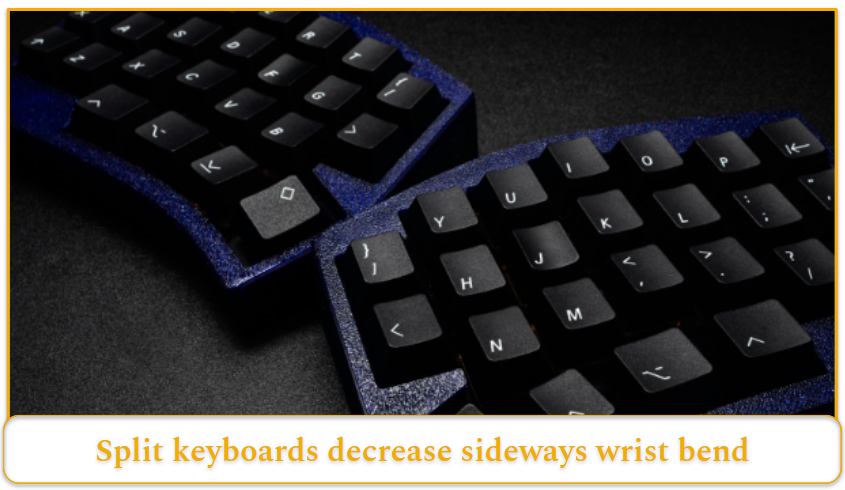
Credit: Peppy Toad, Unsplash
Tented or gabled keyboards raise the center of the keyboard so the hands approach the keys at an inward angle. This reduces forearm pronation, the palms-down rotation typical when typing on flat keyboards. Adjustable tented models can significantly reduce pronation and may also decrease ulnar deviation depending on the design.
Curved or contoured keyboards shape the key rows to reduce reach distance and maintain straighter wrist alignment. Many commercial products combine curvature, split geometry, and tenting into a single integrated form.
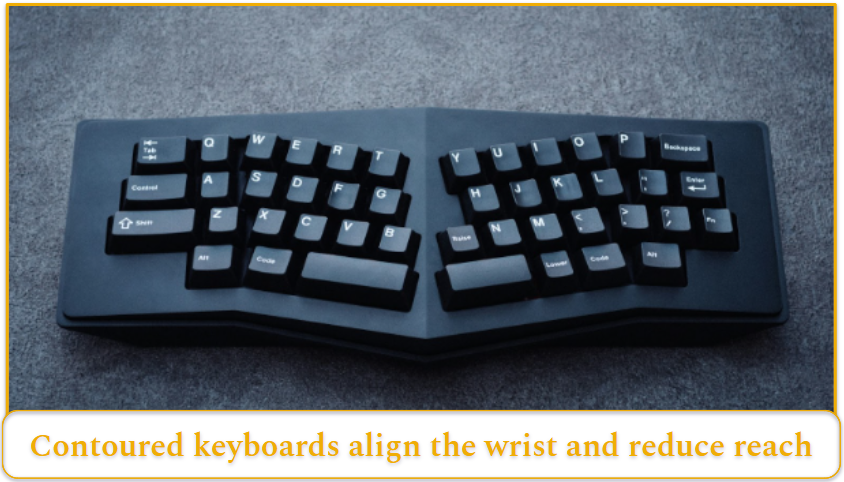
Credit: Peppy Toad, Unsplash
Negative-tilt or low-profile keyboards address wrist extension. Instead of sloping upward at the back, they remain flat or tilt slightly away from the user. Research indicates that lowering the keyboard angle meaningfully reduces the upward bend of the wrist during typing.
Compact layouts remove or reposition the numeric keypad to bring the mouse closer to the body. In this case, the advantage often lies in reducing shoulder reach rather than altering wrist posture directly.
For example, if your mouse sits far to the right of a full-size keyboard, switching to a compact model may immediately reduce shoulder strain.
The Science Behind Strain in Typing
Typing itself is not inherently hazardous. Problems tend to arise when low-force repetitive movements continue for extended periods, especially when combined with awkward postures or sustained contact pressure.
On a standard flat keyboard, forearms are usually pronated, and wrists may be extended or deviated. The extent of these positions depends on keyboard width, slope, height, and user posture.
Key Joint Positions Affected by Ergonomic Keyboards
- Forearm pronation occurs when the palms face downward. Tented keyboards reduce the degree of pronation by allowing a more angled hand position.
- Ulnar deviation refers to bending the wrist toward the little finger. Wide, straight keyboards can promote this position, particularly when elbows remain close to the torso. Split designs consistently reduce this deviation in controlled settings.
- Wrist extension describes bending the hand upward relative to the forearm. Keyboard thickness and slope strongly influence extension. Lower or negatively tilted keyboards reduce this angle during typing.
It is important to recognize trade-offs. Excessively widening a split keyboard may reduce ulnar deviation but increase other stresses, such as shoulder abduction (raising the arms outward away from the body) or radial deviation (bending the wrist toward the thumb side). Moderate adjustments often provide the best overall alignment.
Why Posture Changes Could Matter Physiologically
One physiological factor frequently discussed in ergonomics research is pressure within the carpal tunnel. This narrow passage at the wrist contains the median nerve and flexor tendons.
Studies show that carpal tunnel pressure is lowest when the wrist is near neutral. As the wrist bends upward, downward, or sideways, pressure increases. Typing itself adds to this pressure compared with holding the same posture without movement.
Greater wrist extension, particularly beyond roughly 30 degrees, and certain deviations are associated with higher internal pressures. Resting the palms against a surface during typing can also elevate pressure due to direct contact force.
For this reason, ergonomic keyboards are seen as tools for modifying risk factors. By reducing extreme wrist positions and contact stress, they may lower physiological loads linked to discomfort in some individuals.
Posture and the Right Keyboard
Better Posture
Ergonomic keyboards improve wrist and arm position compared with traditional flat keyboards.
They often:
- Reduce ulnar deviation (wrists bending outward)
- Reduce forearm pronation (hands rotated downward)
- Reduce wrist extension (wrists bending upward)
Keyboards that are split and tented (angled upward in the middle) tend to create the biggest posture improvements. Also, keyboards with a lower or negative slope reliably reduce how much the wrists bend upward.
Matching the Keyboard to the Problem
Different designs help with different posture issues:
- If your wrists bend upward, a low-profile or negative-tilt keyboard can help reduce that angle.
- If your wrists angle outward, a split keyboard can help keep them straighter.
How the Right Keyboard can Reduce Strain
Pressure inside the carpal tunnel increases when the wrists are in extreme positions and during typing. By keeping the wrists closer to a neutral position, ergonomic keyboards may reduce mechanical stress on the tissues. Although evidence does not conclusively prove that ergonomic keyboards prevent injuries or diseases, they can reduce strain.
Limitation: Keyboards are only one element.
It is worth noting that although ergonomic keyboards are helpful, comprehensive ergonomics often requires multiple adjustments, including chair height, monitor position, work pacing, and break habits. Changing only the keyboard may have a limited impact if other factors remain suboptimal.
How to Use an Ergonomic Keyboard Properly
The effectiveness of an ergonomic keyboard depends heavily on setup and technique.
Set the Workstation First
Position the keyboard so that:
- elbows rest near the sides
- forearms remain roughly level
- wrists stay straight rather than bent upward or sideways
Keep the keyboard and monitor centered to avoid twisting the torso. Leave space in front of the keyboard so hands can rest between typing sessions rather than pressing into a surface while keying. Place the mouse close enough to avoid excessive reaching.
Adjust With Moderation
- Lower keyboard height and flatter or slightly negative slopes can reduce extension and pronation.
- Moderate split angles often balance reduced ulnar deviation with comfortable shoulder positioning.
- Avoid extreme configurations unless carefully evaluated.
Allow Time to Adapt
Initial discomfort may decrease over several weeks as you adjust. Evaluate changes objectively by noting symptom trends, typing accuracy, and visible posture improvements rather than relying solely on first impressions.
Seek Professional Advice if Needed
Persistent neurological symptoms such as numbness or nighttime waking warrant clinical assessment. Ergonomic equipment can support management but does not replace diagnosis or treatment.
Conclusion
The most consistently supported benefit of ergonomic keyboards is improved wrist and forearm alignment.
Split, tented, and adjustable-slope designs reduce ulnar deviation, pronation, and wrist extension compared with conventional keyboards. These changes matter because wrist posture directly influences mechanical stress during typing.
Evidence is less definitive when evaluating pain relief or prevention of specific disorders. For many users, ergonomic keyboards can be part of a broader strategy to manage typing strain, but they are not a guaranteed solution.