





























Unlike a traditional watch, which serves mainly as a timepiece and fashion statement, a smartwatch is all about functionality. That means people generally wear them more often than their stylish counterparts, especially when outdoors or working out. They’re great for staying on top of our health and fitness, but the downside is that sweat, oil, and grime can build up quickly. Regular cleaning is essential to keep your smartwatch working properly and looking its best.
The good news is that cleaning a smartwatch is simple, but there are a few steps to ensure you do it safely and without causing damage. Whether you own an Apple Watch, a Google Pixel Watch, or a Garmin Venu 3, the process is largely the same. We’ll give you the step-by-step breakdown you should follow to get your smartwatch back to looking and feeling brand new.
What Do You Need To Clean a Smartwatch?
Before you start, gather the following items. You won’t necessarily need all of them every time, but having them on hand makes the process easier.
- Microfiber cloth
- Warm water
- Soft-bristled toothbrush (optional)
- Cotton swab (optional)
- Mild liquid hand soap (optional)
- Isopropyl alcohol (70% or less) or disinfecting wipes (optional)
How To Clean a Smartwatch: Step by Step
Step 1: Power Off
After gathering your cleaning supplies, the first step is to power off your smartwatch. Just as you wouldn’t clean a TV screen while it’s on, you want to avoid doing so with your smartwatch to reduce the risk of accidental button presses or potential damage from water, soap or alcohol. ![[MK]: How To Clean a Smart Watch](https://www.market.com/wp-content/uploads/2025/12/-mk-how-to-clean-a-smart-watch-1.png)
There’s a good chance your watch has a physical button that brings up a power-off prompt. If it doesn’t have a button for that, just navigate over to the Settings menu and find the power-off option. After you’ve done that, you’re ready to move on to the next step.
Step 2: Take the Straps Off
We’re going to want to disassemble the watch, so to speak, to make cleaning every component more manageable. But all that really means is taking off the straps.
Most smartwatches have small buttons that allow you to slide the straps off. Some watches may require a spring bar tool to loosen the bands, but in most instances, no tools are needed.
Step 3: Wipe Down the Watch Body
![[MK]: How To Clean a Smart Watch](https://www.market.com/wp-content/uploads/2025/12/-mk-how-to-clean-a-smart-watch-3.png)
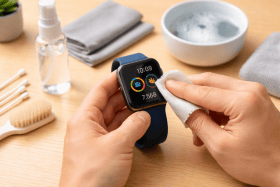
Lightly dampen a microfiber cloth with warm water or a mild soap-and-water solution. Gently wipe the watch screen, sides, and back of the watch, using light pressure on areas where sweat, dirt, and grime have built up. Avoid getting moisture near ports, buttons, or sensors. For tight spots like edges, use a cotton swab or soft-bristled brush.
Once the watch body is clean, go over it again with a dry cloth. Make sure all moisture is removed and the watch is dry before moving on to the next step.
Step 4: Clean the Straps
Does your smartwatch have silicone, leather, or metal straps? We ask because the way you clean your straps depends on their material. Some bands are better suited for alcohol-based cleaning, while others are best if cleaned just with some warm water and a cloth.
Leather straps should be wiped with a slightly damp cloth only. Avoid alcohol, soaking, or excessive water, and never leave leather bands to dry in direct sunlight, as this can crack the leather. Instead, let them air-dry in a cool, dry place to prevent issues.
Silicone or rubber straps are the easiest to clean. Wash them with warm water or a mix of water and mild liquid soap. With your fingers or a soft-bristle brush, you can effectively remove dirt and grime.
Metal straps can be wiped down with warm water, a mild soap solution, or alcohol. After cleaning, rinse them thoroughly and dry the bands with a soft cloth to prevent moisture from causing corrosion.
Step 5: Clean the Sensors and Charging Contacts
![[MK]: How To Clean a Smart Watch](https://www.market.com/wp-content/uploads/2025/12/-mk-how-to-clean-a-smart-watch-5.png)
The sensors and charging contacts are the most sensitive components of a smartwatch, so extra care is essential. A buildup of sweat, lotion, or dust, combined with a lack of regular cleaning, can damage the device. You might experience trouble charging the smartwatch or sensor issues that throw health and fitness readings off.
Keep the following in mind when cleaning the charging contacts, ports, and sensors:
- Always power off: Working on sensitive components while the system is operational can cause damage.
- Avoid alcohol: While effective for disinfecting the body and screen, alcohol can harm sensors and charging contacts. Stick to warm water or a mild soap-and-water mix.
- Dry cloth first: Often, a dry microfiber cloth is enough to remove mild sweat or dirt without needing water.
- Ensure components are dry before charging: Never charge the watch while sensors or contacts are wet, as this can damage both the watch and the charger.
Step 6: Reattach the Straps
![[MK]: How To Clean a Smart Watch](https://www.market.com/wp-content/uploads/2025/12/-mk-how-to-clean-a-smart-watch-6.png)
Once your smartwatch is squeaky clean and fully dry, it’s time to put it back together.
Hold the watch body in one hand and slide the top strap into its groove until you hear or feel a small click. Repeat the process with the bottom strap. When both straps are secure, your watch is ready to wear again.
Step 7: One Last Check
![[MK]: How To Clean a Smart Watch](https://www.market.com/wp-content/uploads/2025/12/-mk-how-to-clean-a-smart-watch-7.png)
Now let’s just make sure everything is in working order. Power on the watch and take a moment to inspect it. If you notice any smudges or streaks, go ahead and give it another wipe with your microfiber cloth until they’re gone. Flip the watch over and look closely at the ports, charging contacts, and sensors to make sure there’s no debris or moisture. If there is, simply wipe it down to get it 100% clean.
Things To Keep in Mind
Warranty Considerations
Warranties are often strict about owner-caused damage, so it’s a good idea to review your smartwatch’s warranty carefully. In any case, avoid using harsh chemicals or abrasive tools that could harm the watch and void coverage.
Understanding IP Ratings
Ingress Protection (IP) ratings are designations that indicate how well protected electronics are from dust and water. If you see an X in an IP rating, it simply means that it hasn’t sufficiently been tested for that metric.
Your smartwatch’s IP rating can help you determine how careful you need to be when cleaning it. Here’s a breakdown of the most common IP ratings you’ll see, not just for smartwatches, but many other electronics as well.
- IPX4: Splash-resistant from any angle
- IPX5: Protected from water jets from any angle
- IPX6: Protected against powerful water jets
- IPX7: Water-resistant; can be fully submerged up to 13 feet
- IP5X: Dust protected
- IP6X: Dust-tight
Post-Cleaning Care
You’ve just finished cleaning your smartwatch. Now what?
Well, caring for your smartwatch after cleaning is just as important as the cleaning itself. That’s why you’ll want to take our advice here and follow these post-cleaning steps:
- Dry completely. Make sure every component of your smartwatch is dry before wearing it or charging it.
- Store properly. Keep your watch in a dry, cool place whenever you’re not wearing it to prolong battery and sensor lifespan.
How Often Should You Clean Your Smartwatch?
Do you wear your smartwatch every day? Only when you go hiking or swimming? To sleep? In any case, cleaning frequency depends on how you use your smartwatch.
You can get by with cleaning it once every 3–4 weeks if you only wear it casually. However, if you’re an athlete or gym-goer, you might want to consider cleaning it at least once a week. We also recommend washing it whenever it’s exposed to heavy outdoor elements like dirt, sand, or chemicals.
Extra Care Tips
You want to clean your smartwatch as often as possible, but you also don’t want to spend every second of the day doing so. That’s why we recommend following these three tips to keep your smartwatch as clean as possible and reduce how often you need to bust out the cleaning kit:
- Remove before applying lotions or sunscreen: Excess oils and creams can damage the watch or leave residue on sensors.
- Rinse after swimming: Chlorine, salt, and other chemicals can harm sensors if not rinsed off thoroughly.
- Avoid harsh cleaning agents and abrasive materials: These can damage your watch and may void your warranty, leaving you unprotected if other issues arise.
![Apple Watch Series 10 [GPS 46mm case] Smartwatch with Jet Black Aluminum Case with Black Sport Band - M/L. Fitness Tracker, ECG App, Always-On Retina Display, Water Resistant](https://m.media-amazon.com/images/I/31Cud2WnszL._SL500_.jpg)


![Baolubao Smart Watch W80Pro[GPS& AI] Smartwatch with Bluetooth Call & Text, Health, Fitness & Sleep Tracker, Sports Watch for Men, 60-Day, Flashlight, Standby Display Time,Android & iOS, Black](https://m.media-amazon.com/images/I/51p6vTgUbEL._SL500_.jpg)


![Samsung Galaxy Watch 7 40mm Bluetooth AI Smartwatch w/Energy Score, Wellness Tips, Heart Rate Tracking, Sleep Monitor, Fitness Tracker, 2024, Green [US Version, 1Yr Manufacturer Warranty]](https://m.media-amazon.com/images/I/41ew4GQ5kML._SL500_.jpg)
