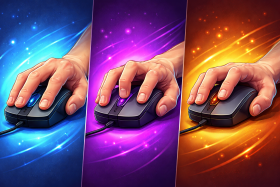
A lot of people don’t give it much thought, but the way you hold your mouse matters more than you might realize. Your grip style affects everything from comfort, to precision and cursor speed. Perhaps most importantly though, whether you’re gaming or working it plays a significant role in how fatigued your hand feels after hours at your desk.
Choosing a mouse that matches your natural grip improves ergonomics but might not be best suited for the task at hand. Understanding each of the different grip styles helps you make a smarter choice when shopping for your next mouse, so let’s dive into which is which, and which style you need.
Quick Answer: What Are the Different Mouse Grip Styles?
The three main mouse grip styles are palm, claw, and fingertip. Palm grip rests your whole hand on the mouse for comfort, claw grip arches your fingers for faster clicks and control, and fingertip grip uses only your fingers for maximum speed and precision. Most people naturally fall into one, though hybrid grips are common.
Is There a “Best” Mouse Grip Style?
There’s no universal best—only what fits your hand, task, and comfort.
- Palm grip → best for comfort and long sessions
- Claw grip → best balance of speed + control
- Fingertip grip → best for fast, precise movements
Your ideal grip depends on what you do most (gaming vs work) and how your hand naturally rests on the mouse.
Someone playing competitive shooters has different needs than someone editing spreadsheets all day, someone with larger hands will favor a different grip to someone with more petite fingers.
The goal is to understand what each grip offers so you can match it to a mouse that works with your hand, not against it.
Palm Grip
![[MK] Draft: Mouse Grip Styles](https://www.market.com/wp-content/uploads/2026/03/-mk-draft-mouse-grip-styles-1.png)
With a palm grip, your entire hand rests on the mouse, with fingers lying flat across the buttons. The mouse supports most of your hand’s weight, making it the most relaxed and intuitive style.
Pros:
- Most comfortable for extended use
- Reduces hand and wrist fatigue
- Easy to maintain without thinking about it
- Works well with larger mice that fill the hand
Cons:
- Slower to make quick, precise adjustments
- Less agility for fast flick movements
- Relies heavily on arm movement rather than finger control
Best for:
- Productivity work
- Casual gaming
- Users with larger hands
- Prioritising comfort over speed
Claw Grip
![[MK] Draft: Mouse Grip Styles](https://www.market.com/wp-content/uploads/2026/03/-mk-draft-mouse-grip-styles-2.png)
Claw grip sits between palm and fingertip. Your palm rests on the back of the mouse while your fingers arch upward, creating a more active and responsive position.
Pros:
- Faster click response than palm grip
- Good balance of comfort and precision
- Allows for quick micro-adjustments
- Works well with medium-sized mice
Cons:
- More tiring over long sessions
- Can cause strain if you grip too tightly
- Takes some adjustment if you’re used to palm grip
Best for:
- FPS gaming
- Precision work
- Users who want a balance of speed and control
Fingertip Grip
![[MK] Draft: Mouse Grip Styles](https://www.market.com/wp-content/uploads/2026/03/-mk-draft-mouse-grip-styles-3.png)
The fingertip grip is the lightest touch because only your fingertips touch the mouse. Instead of resting on the back, your palm hovers above or behind the mouse entirely, and all movement comes from your fingers and wrist. It’s the most agile grip style but also the most demanding.
Pros:
- Maximum speed and manoeuvrability
- Excellent for fast flicks and quick direction changes
- Pairs well with lightweight mice
- Highly responsive for competitive gaming
Cons:
- Most fatiguing grip style
- Less comfortable for extended sessions
- Requires more precise mouse control
- Not ideal for larger hands or larger mice
Common mistake: The fingertip grip is only really viable with lightweight mice. Trying to use a fingertip grip on an ergonomic mouse designed for a palm grip will not only negate the performance benefits but quickly lead to fatigue.
Best for:
- Fast-paced competitive games
- Lightweight mouse enthusiasts
- Users with smaller hands
How Do I Know Which Mouse Grip Style I Have?
Most people don’t consciously choose a default grip style, it develops naturally based on hand size, mouse shape, and habit. To identify yours, grab your mouse as you normally would and check the following:
Palm Contact
- Full contact = Palm grip
- Back-only contact = Claw grip
- No contact = Fingertip grip
Finger Position
- Flat = Palm
- Arched = Claw
- Tips only = Fingertip
Movement Style
- Arm-driven = Palm
- Wrist + fingers = Claw
- Fingers only = Fingertip
If you fall somewhere in between, that’s a hybrid grip (super common).
How to Choose the Right Mouse for Your Grip
Grip style should guide your mouse choice, not the other way around. Here’s what to consider:
Size and Shape
Palm grip: Suits larger, ergonomically contoured mice that fill the hand.
Claw grip: Works best with medium-sized mice that have a pronounced rear hump.
Fingertip grip: Pairs well with smaller, flatter, lightweight mice.
Weight
Heavier mice suit the palm grip’s arm-driven movement. Lighter mice (under 80g) are better for fingertip and claw grip as these are where finger control dominates.
Button Placement
Claw and fingertip grips benefit from buttons that are easy to reach with arched fingers. Palm grip is more forgiving since your fingers naturally rest on the buttons.
Hand Size
Large hands often gravitate toward palm grip with bigger mice. Smaller hands may find fingertip grip more comfortable with compact shapes.
It’s becoming increasingly difficult as the world moves to online shopping, but if possible, try before you buy. A mouse that looks perfect on paper can feel completely wrong in your hand, particularly if it features any pronounced sculpting.