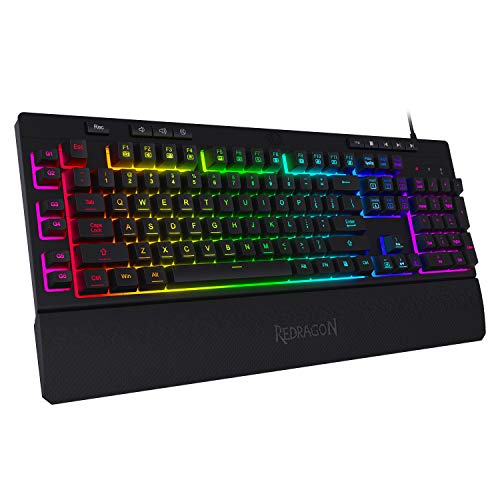
Keyboard mounting style plays a major role in how a keyboard feels, sounds, and holds up over time. While switches often get the spotlight, the way those switches are secured inside the case shapes flexibility, acoustics, and comfort just as much.
Mounting style refers to how the switches — either through a plate or directly onto the PCB (printed circuit board) — are attached inside the keyboard housing. Some builds emphasize rigidity and precision. Others prioritize softness and sound dampening.
Understanding these differences helps you choose a keyboard that matches your typing habits, budget, and acoustic preferences.
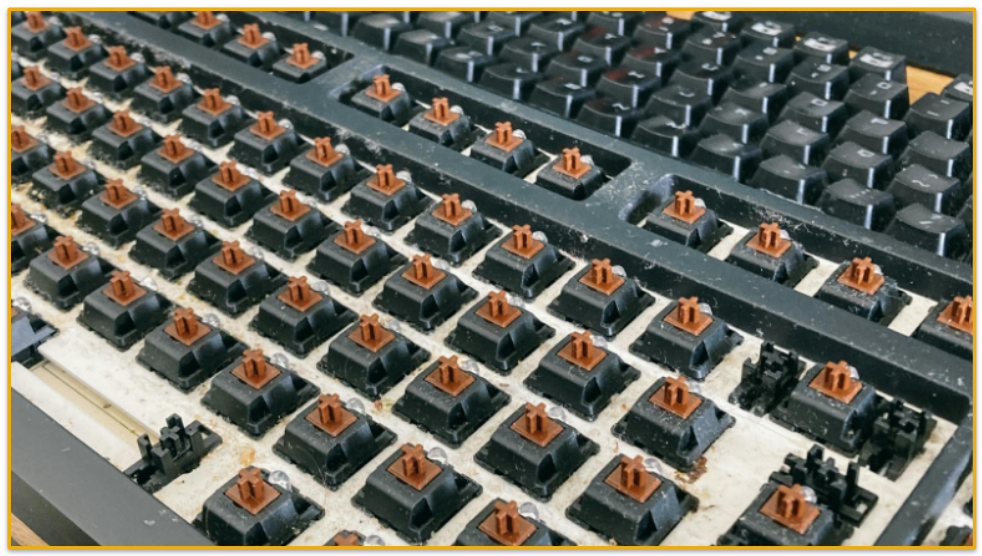
Photo by: Athena Sandrini, Pexels.com
Quick Overview: The Two Main Categories
Most mounting styles fall into two broader types: plate-mounted and PCB-mounted (plateless). PCB stands for Printed Circuit Board, the internal electronic board that connects switches and registers key input.
Plate-Mounted
- Uses a rigid internal plate to hold switches
- Distributes pressure across the case
- Feels firmer and more consistent
- Common in mainstream keyboards
PCB-Mounted (Plateless)
- Switches attach directly to the PCB
- Allows more flex during typing
- Produces a softer, deeper sound
- Popular among enthusiasts
From there, different mounting systems refine how rigidity or flexibility is achieved.
The Most Common Keyboard Mounting Styles Explained
Below are the most widely used mounting methods, broken down by structure, feel, sound, and trade-offs.
Tray Mount
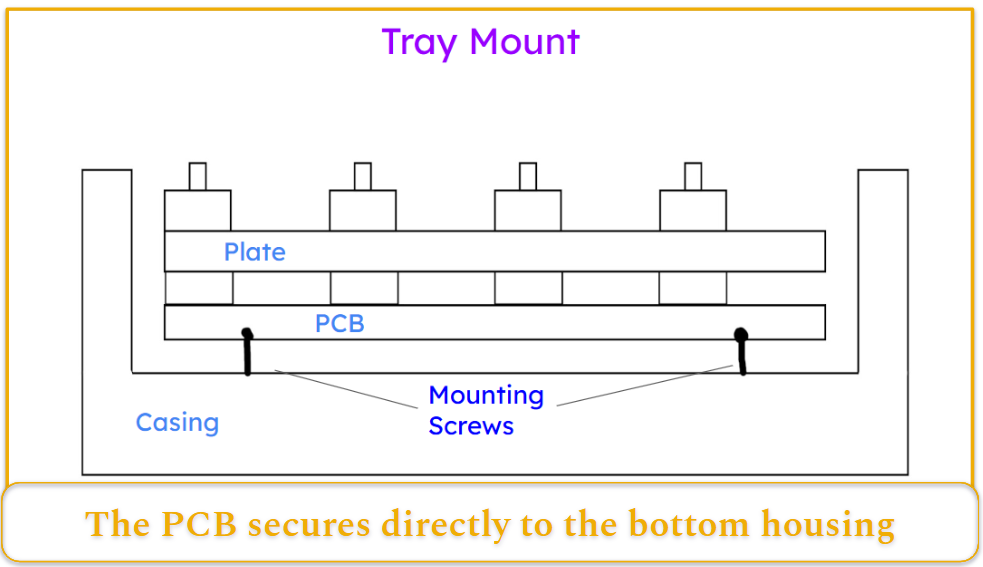
Structure: Tray mounting secures the PCB directly to the bottom housing using screws. The assembly rests inside a shallow enclosure, with minimal support from a top frame.
Feel: The typing response is rigid and inconsistent. Keys above screws feel firmer, while unsupported areas feel softer, creating uneven feedback.
Sound: This layout often produces louder, sharper acoustics. Resonance and uneven tones may occur without damping materials.
Pros:
- Affordable
- Simple to assemble
- Easy to modify
Cons:
- Uneven typing feel
- Limited flexibility
- Harsher acoustics
Tray mount is common in entry-level and budget keyboards.
Top Mount
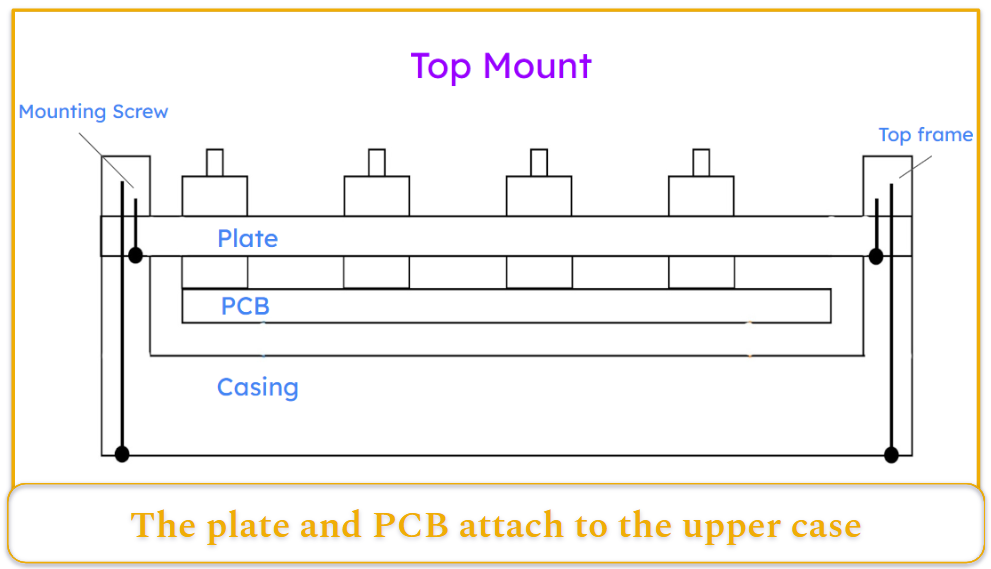
Structure: The plate and PCB attach to the upper case, with screws placed around the perimeter. The lower case primarily supports the assembly.
Feel: Typing feels stable and firm, with minimal flex. Pressure distributes evenly along the edges, producing a consistent response.
Sound: The profile is bright and defined, often emphasizing higher frequencies.
Pros:
- Straightforward construction
- Predictable feedback
- Suitable for fast typing
Cons:
- Stiffness may cause fatigue
- Sound can be louder without damping
Top mount is a favorite for users who prefer precise feedback.
Bottom Mount
Structure: The plate connects to the lower case instead of the top. The upper housing often clips or attaches separately.
Feel: Slightly softer than top mount, with modest flex and improved comfort during long sessions.
Sound: Generally quieter and warmer, especially when foam is used.
Pros:
- Balanced comfort and stability
- Compatible with layered damping
Cons:
- More involved assembly
- Potentially higher cost
Bottom mount offers a middle ground between firmness and comfort.
Sandwich Mount
Structure: The plate sits between top and bottom case halves, held firmly along its edges.
Feel: Stable yet moderately flexible. Typing feels responsive without excessive rigidity.
Sound: Balanced tone, combining clarity with some warmth depending on materials.
Pros:
- Consistent feel
- Appealing layered construction
Cons:
- Requires precise alignment
- Can be harder to assemble
Often seen in mid-range custom builds.
Gasket Mount
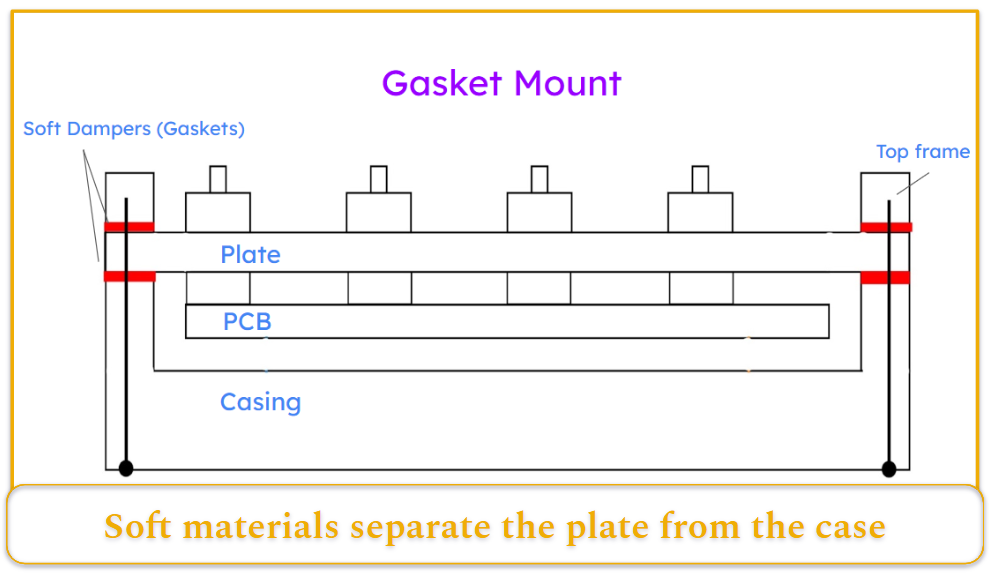
Structure: Soft materials separate the plate from the case, suspending it with rubber or foam elements.
Feel: Cushioned and uniform. Keys compress slightly and rebound smoothly, reducing fatigue.
Sound: Deep, muted tones with reduced high-frequency noise.
Pros:
- Smooth typing
- Excellent sound dampening
- Consistent feel
Cons:
- More complex design
- Higher cost
- Potential wear of soft materials
Gasket mount is currently one of the most popular premium options.
Integrated Plate (Single-Body)
Structure: The plate and top case form a single piece, eliminating separate mounting components.
Feel: Extremely firm with almost no flex. Each press feels precise and direct.
Sound: Loud and metallic, with strong resonance.
Pros:
- Durable
- Simple construction
- Stable typing response
Cons:
- Harsh feel for some users
- Limited customization options
Common in minimalist or rigid-focused designs.
Spring Mount (Flex/Cushion Springs)
Structure: Metal springs support the plate or PCB above the case, allowing movement during typing.
Feel: Elastic and bouncy, with noticeable rebound.
Sound: Deep and resonant, sometimes accompanied by subtle spring vibration.
Pros:
- Adjustable flexibility
- Reduced fatigue
Cons:
- Complex engineering
- Higher production costs
Mostly found in experimental or premium enthusiast keyboards.
Leaf-Spring Mount
Structure: Flat metal arms act as springs beneath the plate, flexing outward during use.
Feel: Smooth, controlled elasticity with consistent movement.
Sound: Clean and balanced, with moderate damping.
Pros:
- Precision tuning
- Uniform response
Cons:
- Difficult to manufacture
- Limited availability
A niche but highly refined mounting system.
Plateless (PCB) Mount
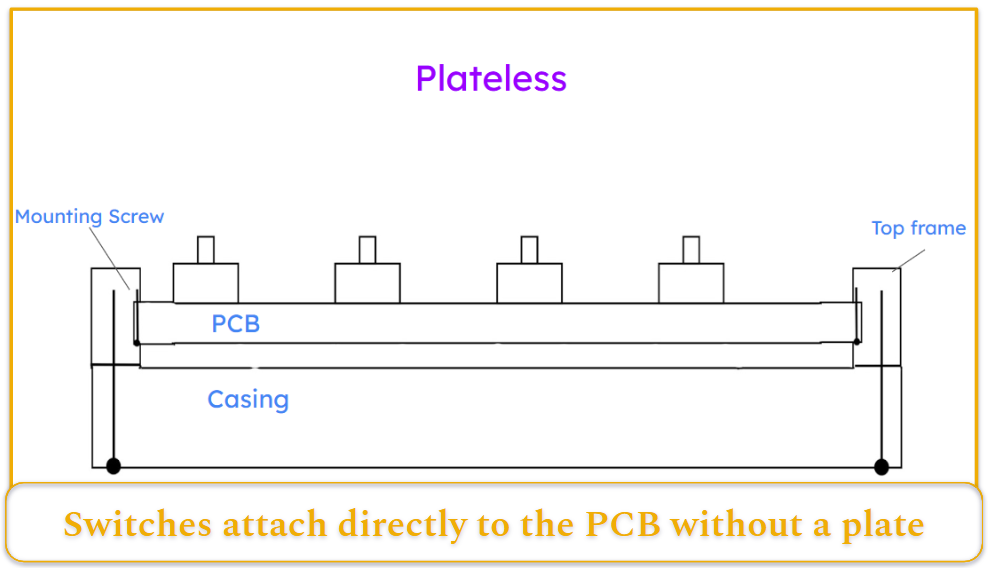
Structure: Switches attach directly to the PCB without a plate, which may include flexible design elements.
Feel: Extremely soft and flexible, with more movement during keypresses.
Sound: Deep, rounded acoustics with reduced sharpness.
Pros:
- Lightweight
- Inexpensive
- Unique typing sensation
Cons:
- Reduced stability
- Compatibility limitations
Favored by enthusiasts seeking maximum flex.
How Mounting Styles Compare in Real Use
Let’s quick outline how mounting styles compare across key factors including: feel, consistency, acoustics, build complexity, cost, and ease of modification.
Typing Feel (Soft → Firm)
Plateless → Spring/Leaf → Gasket → Bottom/Sandwich → Top → Tray → Integrated
Sound Profile
- Softer mounts = deeper, muted tones
- Rigid mounts = brighter, sharper acoustics
- Tray mounts may sound uneven
Build Complexity
- Simplest: Tray
- Moderate: Top, Bottom, Sandwich
- Most complex: Gasket, Spring, Leaf
Cost
- Budget: Tray, Plateless
- Mid-range: Top, Sandwich
- Premium: Gasket, Spring, Leaf
Modding & Repair
- Screw-based mounts are easier to modify
- Integrated and advanced systems limit adjustments
How to Choose the Right Mounting Style for You
There isn’t a universally “best” mounting style, only the one that fits how you use your keyboard. Here’s how to narrow it down based on what matters most to you.
If You Game Frequently…
Look for firmer, more stable mounts:
- Top mount
- Integrated plate
- Tray mount
These designs offer predictable feedback with minimal flex. That consistency can feel more precise during fast key presses and repeated inputs.
If you prefer a very direct, controlled keystroke, rigid builds tend to feel more responsive.
If You Type for Long Sessions…
Comfort becomes more important than rigidity.
Consider:
- Gasket mount
- Bottom mount
- Spring or leaf-spring systems
- Plateless builds
These allow controlled flex, which reduces finger fatigue and softens bottom-out impact. The cushioning effect can make long writing or coding sessions more comfortable.
If You Want a Quieter Keyboard…
Mounting style affects acoustics more than many people expect.
- Gasket mounts produce the most muted, refined sound.
- Bottom mounts with foam also dampen noise well.
- Rigid mounts (top, tray, integrated) tend to sound brighter and louder.
If you work in shared spaces, softer mounting systems are usually preferable.
If You’re on a Budget…
Entry-level keyboards typically use:
- Tray mount
- Integrated plate
These are affordable and durable, though less refined in feel and acoustics.
Premium systems like gasket, spring, and leaf mounts increase cost due to added materials and engineering complexity.
If You Plan to Modify or Customize…
Simpler mounting systems are easier to open and adjust.
- Screw-based mounts (tray, top) are mod-friendly.
- Integrated and advanced spring systems limit internal access.
- Gasket builds require more careful disassembly.
If you enjoy tuning foam, swapping plates, or experimenting, accessibility matters.
If You Want Portability…
Compact and lightweight boards often rely on:
- Tray mount
- Plateless designs
These reduce structural weight and complexity. More elaborate mounting systems are usually found in heavier, premium builds.
TIP: For a broader overview of choosing a keyboard, check out my main keyboard guide.
Industry Trends
Early keyboards favored tray and integrated designs because they were simple and inexpensive.
As the enthusiast market grew, top and sandwich mounts became more common. Recently, gasket mounting has gained widespread popularity due to its comfort and acoustic refinement.
Spring and leaf systems are emerging in premium builds, pushing flexibility even further.
Mass-market keyboards still prioritize cost and durability, but softer, more refined typing experiences are increasingly influencing design.
What It All Comes Down To
Mounting style matters as much as switches or keycaps. It shapes typing feel, sound profile, and long-term comfort.
- Tray mounts are affordable but can feel uneven.
- Top mounts are firm and precise.
- Bottom and sandwich mounts balance comfort and stability.
- Gasket mounts prioritize smoothness and acoustic refinement.
- Spring and leaf systems push flexibility further.
- Plateless builds emphasize softness but sacrifice rigidity.
There is no universally perfect mounting style. The best choice depends on how you use your keyboard — and what kind of feedback feels right to you.
Hands-on experience remains the best way to decide.