Choosing between a tablet and a laptop isn’t as obvious as it used to be. Tablets are now powerful enough for real work, and laptops are more portable and efficient than ever. That’s what makes this decision tricky: both can technically handle everyday tasks, but they feel very different to use.
This guide focuses on what actually matters, including how each device fits into your daily routine, where each one creates friction (or removes it), and which is better for your specific use case.
Quick Answer: Tablet vs. Laptop
If you mainly read, watch, take notes, or use apps on the go, a tablet is the better choice. If you spend hours typing, multitasking, managing files, or using full desktop software, a laptop is the safer and more capable option.
Tablet vs. Laptop: Core Differences (At a Glance)
How Tablets, Laptops, and Hybrids Differ
Tablet (Touch-First Device)
Tablets are designed for direct interaction—tap, swipe, draw.
They’re best for:
- Reading, browsing, streaming
- Handwritten notes and sketching
- Light productivity and communication
You can turn a tablet into a laptop-like setup with:
- Keyboard case
- Stylus
- External storage
…but it still feels most natural as a handheld device first.
Laptop (Productivity-First Device)
Laptops are built for work from the start.
They excel at:
- Long typing sessions
- Multitasking with multiple windows
- File management and downloads
- Running full desktop software
There’s no setup required; you open it and work.
Hybrid (2-in-1 Devices)
Hybrids try to combine both but always involve trade-offs:
- Detachable tablets → Great flexibility, weaker lap typing
- Convertible laptops → Better typing, heavier in tablet mode
They’re best for users who genuinely need both modes regularly.
Portability: What Actually Feels More Mobile
This is where tablets clearly stand out—but only in specific situations.
Tablet Wins When You:
- Use your device standing, on the couch, or in bed
- Want something comfortable to hold for long periods
- Move around frequently throughout the day
Laptop Wins When You:
- Work mostly at a desk or table
- Want one device that handles everything
- Carry your device in a bag anyway
Important: Once you add a keyboard, stylus, and accessories to a tablet, it starts to lose its simplicity advantage.
Battery Life: No Longer a Deciding Factor
Battery used to be a clear tablet win. That’s no longer true.
- Tablets: still efficient and reliable for all-day casual use
- Laptops: now regularly match or exceed tablet battery life
Productivity and Multitasking: Where Laptops Still Win
If your work involves:
- Long documents
- Spreadsheets
- Multiple browser tabs
- File downloads and organization
A laptop is noticeably easier and faster.
Why laptops still lead:
- Built-in keyboard and trackpad
- Better window management
- Full desktop apps
- More reliable multitasking
Where Tablets Are Catching Up
Modern tablets can handle:
- Email, documents, and web apps
- Light multitasking (split screen, floating windows)
- External storage and accessories
But:
- The experience is less consistent
- Some apps feel limited compared to desktop versions
Tablets and digital notepads work best for lighter, simpler workflows.
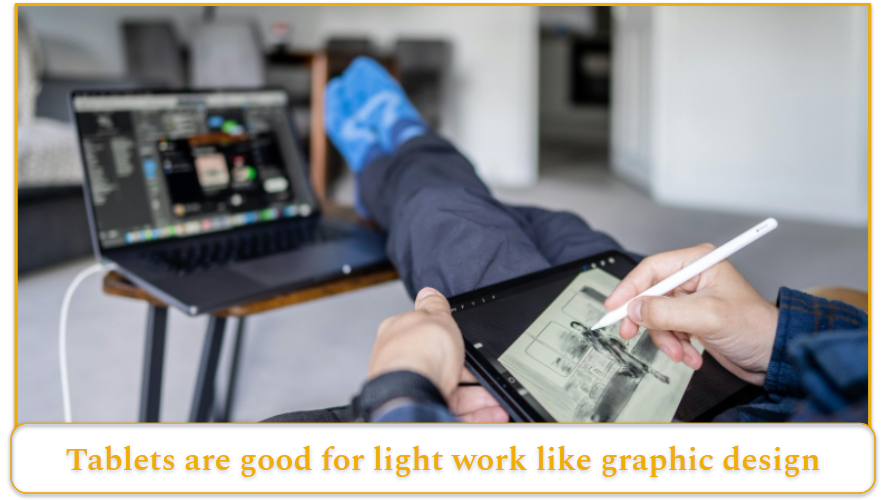
Photo by: Artem Zhukov, Pexels.com
Performance, Creative Work, and Gaming
For everyday speed, tablets and laptops are closer than many buyers expect. Premium tablets easily handle browsing, documents, messaging, streaming, and video calls, so the bigger question is usually workflow fit rather than raw power.
Laptops still have the edge for longer, more complex work. Heavy multitasking, specialist desktop apps, plugin-based creative tools, multi-monitor setups, and niche professional software generally run more naturally on a laptop because the platform offers broader software and hardware support.
Tablets are especially strong for touch and pen-based creative work, including illustration, handwritten notes, markups, brainstorming, and mobile editing. Photoshop on iPad shows how capable that setup has become. But if your work depends on desktop-only apps, specialized plugins, or a traditional external-display setup, a laptop remains the safer main machine.
Gaming also highlights the gap. Tablets are good for mobile games and streaming, but mainstream PC gaming still centers on Windows laptops and desktops.
Price & Value: What You Actually Pay (And What You Get)
Tablet vs. laptop pricing can be misleading if you’re only looking at starting prices.
Tablets appear cheaper upfront. Entry-level models can cost under $200, but these often come with compromises in performance, storage, and overall usability. Realistically, tablets that feel smooth and reliable for everyday use usually start closer to $300–$400, with premium models easily exceeding $1,000.
Laptops follow a similar pattern, but with a higher baseline. While budget options exist around $300, most people will need to spend at least $500–$600 for a laptop that handles daily tasks comfortably. At the higher end, prices climb quickly, but you’re typically getting more power, better multitasking, and fewer limitations.
Where Tablets Can Cost More Than Expected
The biggest pricing trap with tablets is accessories.
A tablet might look like the cheaper option until you add:
- Keyboard
- Case
- Stylus
- Adapters or storage
Suddenly, that “affordable” setup can match or exceed the cost of a solid laptop.
Key takeaway:
- Tablets = lower entry price, higher add-on costs when used for work
- Laptops = higher upfront cost, but more complete out of the box
If you plan to use your device for work, typing, or multitasking, a laptop often delivers better overall value once everything is factored in.
Tablet vs. Laptop: Which Should You Choose?
Choose a tablet if you:
- Mostly browse, stream, and read
- Take handwritten notes
- Want something lightweight and simple
- Prefer touch and pen input
Choose a laptop if you:
- Type frequently
- Multitask heavily
- Use desktop software
- Need reliability for work or school
Choose a hybrid if you:
- Truly need both modes regularly
- Are okay with trade-offs in each
Best Choice by User Type
Students
- Best: Laptop
- Tablet: Great as a secondary device for notes and PDFs
Professionals
- Best: Laptop
- Tablet: Useful for meetings, notes, and mobility
Creatives
- Tablet → Drawing, sketching
- Laptop → Editing, production
Many creatives use both.
Casual Users / Families
- Tablet → Simple, easy, intuitive
- Laptop → Better for shared use and admin tasks