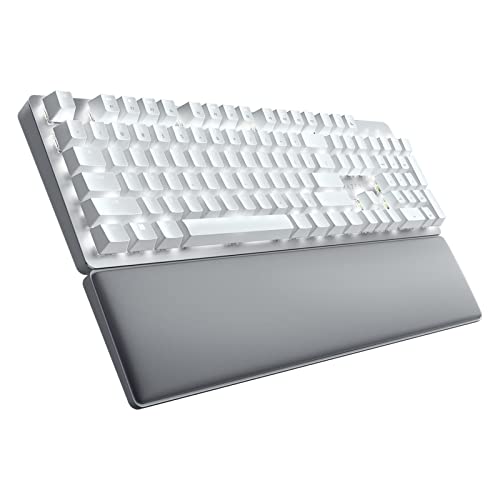


Mechanical keyboards use a different internal design than standard membrane keyboards, and that difference affects feel, durability, and performance. Understanding how they work (and how they compare to other keyboard types) helps you decide whether one is right for your setup.
Quick Answer: What Is a Mechanical Keyboard?
A mechanical keyboard is a keyboard that uses individual mechanical switches under each key instead of a rubber membrane. Each key has its own spring-based switch that registers input with precise actuation, resulting in more consistent feedback, improved durability, and often a more responsive typing experience compared to membrane keyboards.
How Mechanical Keyboards Work
Every key on a mechanical keyboard contains a self-contained switch module. Inside that module are several parts:
- A key stem that moves when pressed
- A coiled spring that provides resistance
- Upper and lower housing
- Two metal contact points that complete the circuit
![[MK] Draft: What is a Mechanical Keyboard](https://www.market.com/wp-content/uploads/2026/02/-mk-draft-what-is-a-mechanical-keyboard-1.png)
Here are the mechanics:
- When you press a key, the stem moves downward and compresses the spring.
- As it travels, two metal contacts touch, closing the electrical circuit and signaling the computer.
- When you release the key, the spring pushes the stem back up, separating the contacts and resetting the switch.
Modern switches often use a crosspoint contact system that activates at a specific actuation point — typically around 1.5 to 2 millimeters into the press. Full key travel is usually about 4 millimeters.
Because each key has its own switch, force and feedback remain consistent across the board. This differs from membrane keyboards, where a single rubber sheet affects all keys and can lead to less precise response.
Read about mechanical keyboard plate materials in my guide.
Switch Types: Linear, Tactile, Clicky
Mechanical switches generally fall into three primary categories based on how they feel and sound during operation.
- Linear switches move smoothly from top to bottom without any tactile interruption or audible click. The force required remains steady throughout the keystroke. A widely recognized example is the Cherry MX Red switch. These switches are favored by users who want uninterrupted motion, particularly in gaming scenarios where rapid, repeated keystrokes are common.
- Tactile switches introduce a noticeable bump partway through the press. This bump indicates the actuation point, allowing users to feel exactly when the key registers without pressing it fully to the bottom. Cherry MX Brown switches are a common representative of this type. Many writers and coders appreciate tactile switches because they provide feedback that can improve typing rhythm and reduce unnecessary force.
- Clicky switches combine tactile feedback with an audible click at the actuation moment. Inside the switch, a small mechanism produces a sharp sound when the bump is overcome. Cherry MX Blue switches are a well-known example. Clicky switches are often preferred by typists who enjoy both the physical and auditory confirmation of each keystroke.
- If you’re a gamer, linear switches are often preferred because they move smoothly without a bump or click, allowing for fast, repeated key presses and quick reactions.
- If you do a lot of typing, tactile switches can be a good middle ground since the small bump lets you feel when a key has actuated, which many people find helps with accuracy.
- Clicky switches are popular with people who enjoy strong feedback while typing, thanks to their noticeable bump and audible click, but they can be loud, so they’re usually best if you’re working alone or in a space where noise isn’t a concern.
How Do Mechanical Keyboards Differ From Membrane Keyboards?
The differences between mechanical and membrane keyboards affect how they feel, perform, and hold up over time. The table below outlines the key distinctions side by side. You can also check out my comparison guide.
![[MK] Draft: What is a Mechanical Keyboard](https://www.market.com/wp-content/uploads/2026/02/-mk-draft-what-is-a-mechanical-keyboard-2.png)
Advantages and Disadvantages of a Mechanical Keyboard
Advantages
- Long-lasting durability
- Consistent, precise feedback
- Faster actuation
- Advanced rollover support
- Extensive customization options
Disadvantages
- Higher cost
- Potentially louder
- Heavier and bulkier
- Less portable than slim membrane keyboards
Choosing between the two depends on priorities. Mechanical keyboards favor performance and longevity. Membrane keyboards favor affordability and portability.
Common Uses
Mechanical keyboards excel in situations where speed, reliability, and comfort matter.
- Gaming: Competitive players often select mechanical boards for their fast response times and accurate multi-key input detection. Short actuation distances help reduce delay, and consistent feedback supports rapid commands.
- Typing and Programming: Writers and developers frequently appreciate the tactile response and steady resistance. Feeling the actuation point can reduce excessive bottoming out, potentially easing finger fatigue during long sessions.
- Office Work: In professional settings, mechanical keyboards can enhance productivity through durability and consistent key feel. Adjustable features such as wrist rests or height settings can improve ergonomics. Noise-sensitive environments may require quieter switch types.
- Casual Use and Travel: For occasional typing or portable setups, the added cost and weight of mechanical keyboards may not be necessary. Standard membrane or laptop keyboards often meet basic needs at a lower price.