

































Gaming keyboards aren’t just standard keyboards with RGB lighting; they’re built specifically for speed, accuracy, and durability under heavy use.
The problem is that a lot of features sound impressive but don’t actually matter for most players. Specs like ultra-high polling rates or niche switch tech can distract from what actually improves gameplay.
This guide focuses on the features that make a real difference, so you can choose a keyboard that performs well instead of just looking good on paper.
For more general guidance on keyboards, see our complete Keyboard Buyer’s Guide.
Quick Answer: What Should You Look for in a Gaming Keyboard?
A good gaming keyboard should have low input latency, mechanical or optical switches (preferably linear), and full n-key rollover (NKRO). Features like rapid trigger and adjustable actuation further improve performance but aren’t essential for most players.
What Makes a Gaming Keyboard Different?
Performance Features That Improve Gameplay
Gaming keyboards include features specifically designed to improve speed and responsiveness in real-world gameplay.
- Rapid Trigger: Keys reset instantly without needing to fully release, allowing faster repeated inputs (especially useful in FPS and rhythm games)
- Adjustable Actuation: Lets you control how far a key must be pressed to activate, so you can fine-tune sensitivity for different playstyles
- Analog Input: Detects how far or hard a key is pressed, enabling more precise control similar to a joystick (useful in racing or flight sims)
Input Accuracy and Reliability
Beyond speed, gaming keyboards are built to ensure every input registers correctly, even during complex actions.
- N-Key Rollover (NKRO): Registers every key press, even when multiple keys are pressed simultaneously
- Anti-Ghosting: Prevents unintended or “phantom” inputs when pressing multiple keys
These features are essential for fast-paced games where missed inputs can directly affect performance.
Customization and Control
Many gaming keyboards offer additional controls that make it easier to adapt your setup to different games or workflows.
- Macro Keys: Assign multiple actions to a single key for faster execution
- Profile Switching: Save and switch between different key layouts or settings quickly
These features are especially useful for MMO, strategy, and productivity-heavy use cases.
Build Quality and Durability
Gaming keyboards are typically built to handle heavier use than standard office keyboards.
- Reinforced frames (often metal or metal-plastic hybrids)
- More durable switches rated for millions of presses
- Less flex and more stability during intense use
This results in a more consistent feel and longer lifespan.
Lighting and Aesthetics
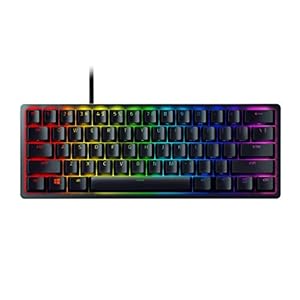
Most gaming keyboards include customizable lighting, which is more about usability and personalization than performance.
- Per-key RGB lighting with adjustable colors and effects
- Software control for custom profiles and brightness
- Some models offer game-reactive lighting for added immersion
While lighting doesn’t impact gameplay directly, it improves visibility and overall setup customization.
Key Specs & Features Explained
Input Latency
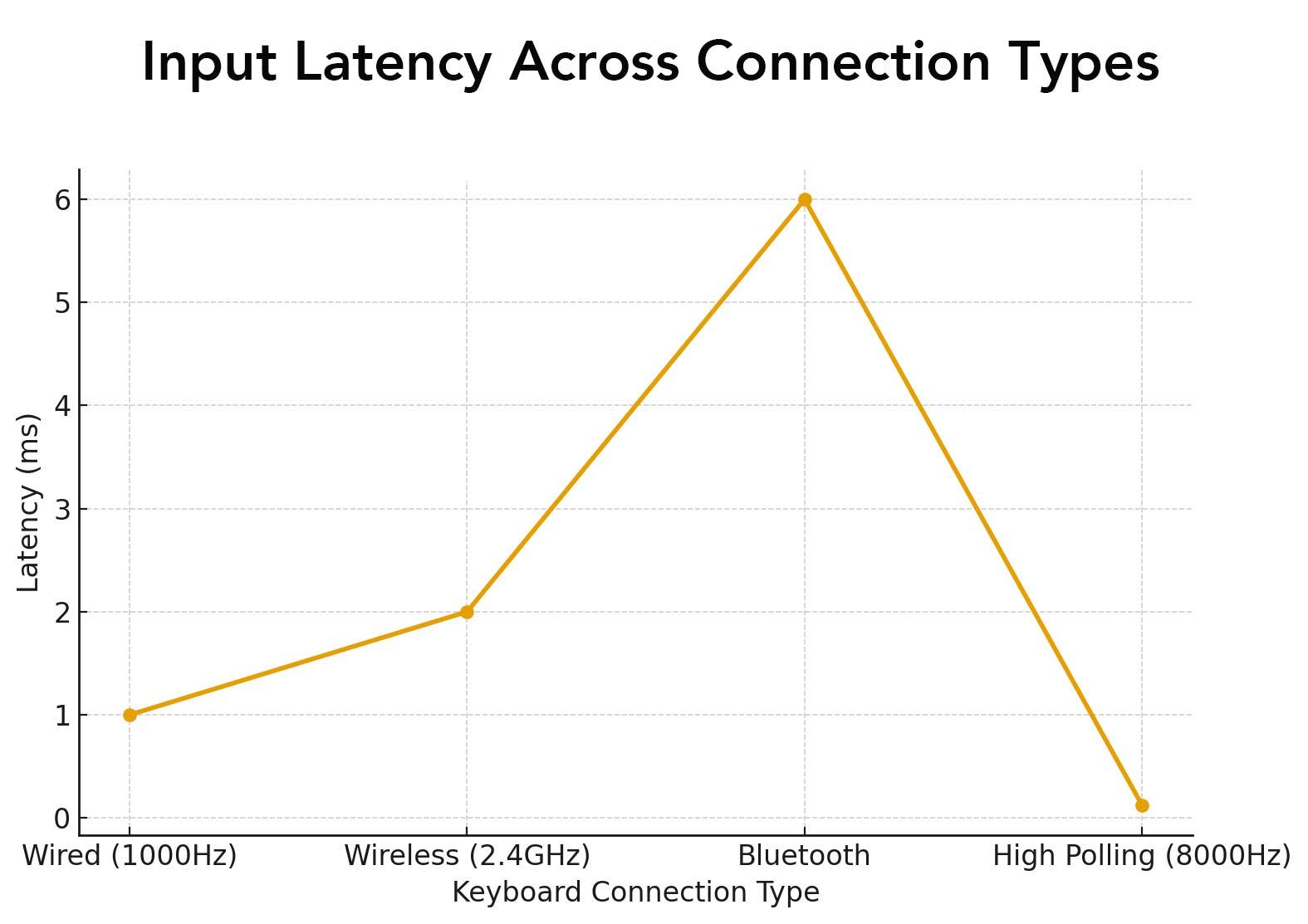
The delay between pressing a key and the action registering. Lower latency is vital for gaming. Wired keyboards typically achieve <1ms latency, whereas wireless models (even high-end Lightspeed or Bluetooth) are often a few milliseconds slower. Gamers often prefer wired or the fastest wireless if every millisecond counts.
Debounce Delay
Key switch contacts bounce when pressed. A debounce circuit or filter prevents multiple registrations. For gaming, a very low debounce (around 0–2ms) is best. Higher debounce values (5–10ms) can noticeably slow double-taps or rapid tapping.
Polling Rate
This tells you how often the keyboard reports to the computer (in Hz). Common values are 1000Hz (1ms interval) and up to 8000Hz (0.125ms) on cutting-edge boards. Higher polling can slightly reduce lag, but gains above ~1000Hz are often imperceptible in regular gaming. Still, enthusiast keyboards advertise 2000–8000Hz for the lowest theoretical latency.
Switch Technology
Describes the mechanism: Mechanical, Membrane, or Scissor. Mechanical switches (spring + stem) offer precise actuation and longevity. Membrane (rubber dome) boards are quieter and cheaper but feel mushy. Scissor switches (found in laptops) are low-profile and quiet. For gaming, mechanical is preferred for fastest response and durability, and many gaming boards use custom or optical-mechanical variants for even quicker actuation.
Switch Type (Feel)
Mechanical switches come in Linear (smooth, no tactile bump), Tactile (bump, no click), or Clicky (bump + click sound). Competitive gamers often favor linear switches for the smooth, consistent actuation. Tactile switches give feedback but slightly slower reset, while clicky are loud (good for typing feel but often avoided in team play).
Keycap Quality
Gaming boards often ship with high-quality keycaps. PBT plastic keycaps (especially double-shot or dye-sublimated) are resistant to shine and wear. Lower-end keycaps use ABS plastic, which can feel cheap and wear smoother legends over time. Gamers planning heavy use may seek boards with PBT double-shot caps for longevity.
Battery Life (Wireless)
For wireless gaming keyboards, longer runtimes mean less downtime. A top-tier wireless gaming board should last 50+ hours on a charge. Lower battery life (<10hr) interrupts play and suggests older radio tech.
Must-Have Features
Serious gamers need to look out for the following features:
- Low Input Latency — A gaming keyboard must register presses as fast as possible. This typically means a wired USB connection (sub-1ms) or a top-tier wireless with ~2ms latency.
- Mechanical or Optical Switches — Mechanical or optical-mechanical switches that provide immediate actuation are essential. These switches ensure fast, reliable key registration and high durability.
- Linear Switches — Linear switches (or other fast-travel types) score highest for gaming, as they allow rapid double-taps and smooth key presses. A linear or fast-actuating switch is generally better for games than a slow-clicky switch.
- Full NKRO with Anti-Ghosting — Every simultaneous keypress should register to avoid missed inputs. Full NKRO or at least 6KRO with anti-ghosting is expected in any serious gaming keyboard.
- Durable Build — A rigid, often metal frame not only lasts longer under heavy use, but also provides a solid feel preferred by gamers. Premium boards use aluminum or steel in the case or top plate.
- Rapid Trigger Support — If available, features like “Rapid Trigger” or “Fast Mode” allow even quicker re-activation of keys. This is a differentiator in some flagship gaming boards (e.g. SteelSeries Apex Pro, NuPhy) and can give a slight edge in competitive gaming.
Nice-to-Have Features
The following features are secondary, but useful nonetheless:
- Hot-Swappable Switches — Many gaming keyboards allow you to replace switches without soldering. This is great for customizers, but not essential to core performance.
- Adjustable Actuation — While useful for fine-tuning, adjustable actuation (changeable trigger points) is a pro-level feature. Most gamers can do fine with fixed actuation.
- Analog Input Support — Fun for niche applications (driving simulators, etc.), but very few games or users need it. If present, it’s a luxury.
- Dedicated Macro/Media Keys — Extra keys for macros or media control are convenient, but many boards achieve similar functionality through software or function layers.
- Advanced Backlighting Effects — While RGB is common, elaborate effects or game-synced lighting are icing on the cake. They enhance immersion but don’t improve gameplay mechanics.
- High Polling Beyond 1000Hz — Anything above the standard 1000Hz is overkill for most users. Very few games require 2000–8000Hz polling. It’s a nice bragging point rather than a must.
- Keycap Quality — Better (PBT double-shot) keycaps resist wear and feel nicer, but can be replaced aftermarket. Important for longevity, but not strictly necessary for gaming per se.
- Battery Life — If choosing wireless, longer life (50+ hours) is convenient. Short battery life simply means more frequent charging – an annoyance but not a deal-breaker if other features are strong.
Recommended Models
SteelSeries Apex Pro Gen3
A flagship wired board with OmniPoint 3.0 Hall-effect switches. It supports adjustable actuation with 40 levels of sensitivity and Rapid Trigger, which makes it one of the fastest options available. Full NKRO, aircraft-grade aluminum, and an OLED display round it out as a top choice for competitive players.
Corsair K100 RGB
Corsair’s premium model featuring OPX optical-mechanical switches with ultra-fast actuation, 4000Hz polling, and a programmable control wheel. It includes per-key RGB, NKRO, PBT keycaps, and a sturdy aluminum top plate. A true showcase of low latency and advanced gaming features.
Razer Huntsman V2
Built with Razer’s optical linear switches for near-instant actuation, the Huntsman V2 focuses on speed and durability. It has a reinforced aluminum frame, full NKRO, advanced sound dampening for quieter operation, and extensive RGB lighting with Synapse software integration.
Logitech G915 TKL
A wireless mechanical board with Logitech’s LIGHTSPEED connection, delivering wired-level 1ms latency. Its low-profile GL switches are available in linear, tactile, or clicky variants. The slim aluminum build, long battery life, and full RGB make it a versatile option for both gaming and productivity.
Keychron Q6
A premium 75% layout wired keyboard with a heavy aluminum case and hot-swappable mechanical switches. It supports NKRO, features high-quality stabilizers, and allows extensive customization through open firmware like VIA/QMK. While not as flashy as others, it’s a solid performer with excellent build quality.
Redragon K552
This keyboard is a compact 87-key mechanical keyboard with Outemu Red switches (linear), full anti-ghosting, and an alloy base plate. It provides a tactile feel and red backlight on a very tight budget.