

At a glance, most keyboards look the same, but once you start using them, the differences become obvious.
Mechanical and membrane keyboards are built on completely different technologies, which affects how they feel, how long they last, and how well they perform for gaming or typing.
This guide breaks down those differences clearly so you can choose the right type based on how you actually use your keyboard, not just specs.
Quick Answer: Mechanical vs. Membrane Keyboards
Mechanical keyboards use individual switches for each key, making them more responsive, durable, and customizable. Membrane keyboards use rubber domes and layered circuits, making them quieter and more affordable, but less precise and shorter-lasting.
What Are Membrane Keyboards?
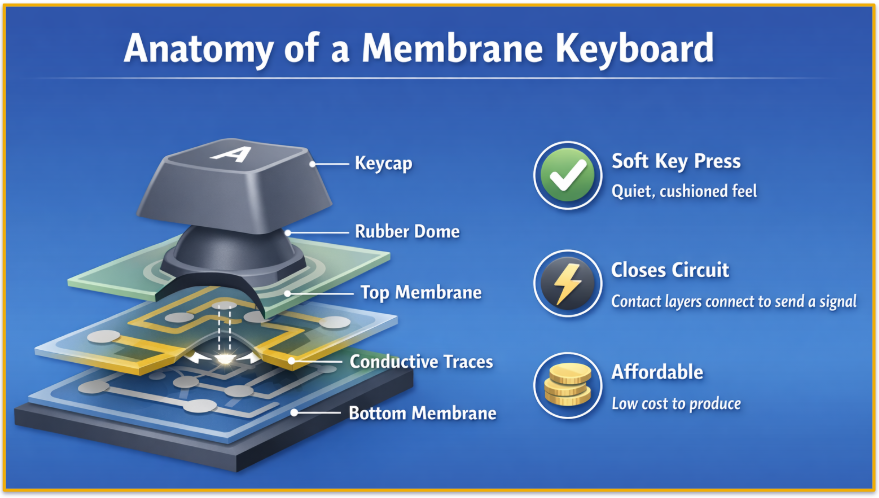
A membrane keyboard is the most common and budget-friendly type. Instead of individual switches, it uses layered materials and rubber domes to register key presses.
How it works:
- Pressing a key collapses a rubber dome
- This pushes a flexible membrane into a conductive layer
- The circuit closes and registers the input
What it feels like:
- Soft and quiet
- Lower resistance
- Slightly “mushy” or less defined
Best for:
- Office environments
- Quiet spaces
- Budget setups
- Light, everyday use
What Are Mechanical Keyboards?
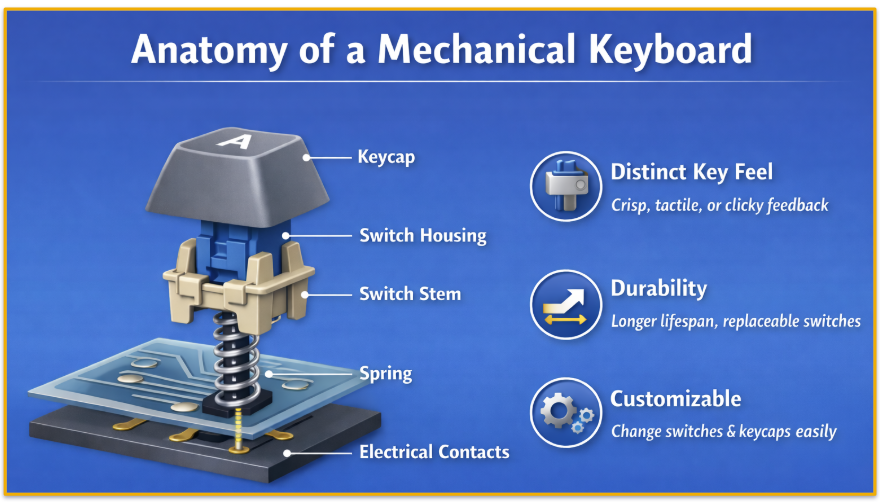
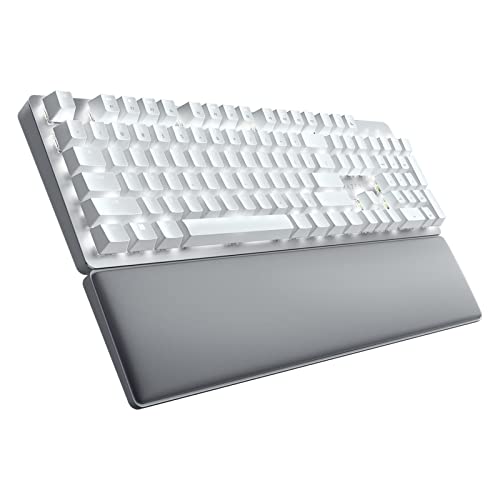
Mechanical keyboards use individual switches under each key, giving them a more precise and consistent feel. Each key has its own components (spring, housing, contacts), which allows for better feedback and durability.
How it works:
- Pressing a key activates a physical switch
- A spring and contact mechanism registers the input
- Feedback is more defined and consistent
What it feels like:
- Crisp and responsive
- More precise key presses
- Can be quiet or loud, depending on switch type
Expert Note: The plate type can also affect how your mechanical keyboard feels, which you can read about in our guide on mechanical keyboard plate materials.
Switch Types:
- Linear: Smooth, fast, no bump (best for gaming)
- Tactile: Noticeable bump for feedback (balanced use)
- Clicky: Bump + audible click (best for typing, not shared spaces)
Best for:
- Gaming
- Heavy typing
- Programming or writing
- Users who care about feel and performance
Comparing Membrane and Mechanical Keyboards
We’ve covered how they work; now let’s help you quickly see which keyboard might suit you best. Here’s a side-by-side look at how membrane and mechanical keyboards compare on key factors.
Pros and Cons
Everyone’s typing style and priorities are different, but if you’re torn between which path to walk down, here’s a quick look at the main pros and cons for each keyboard type.
Membrane Keyboards
Pros:
- Quiet operation
- Affordable
- Lightweight and simple
Cons:
- Less responsive
- Shorter lifespan
- Limited customization
Mechanical Keyboards
Pros:
- Better feedback and accuracy
- Much more durable
- Fully customizable
Cons:
- More expensive
- Can be noisy
- Heavier and bulkier
Choosing the Right Keyboard
Knowing the universal benefits and drawbacks to each keyboard type is a helpful starting point, but the old saying of having the right tool for the job is crucial here, too. Everyone is different, so consider if any of these use cases ring true for you.
For Gaming
Mechanical keyboards are the better choice for gaming keyboards.
They offer:
- Faster response
- More accurate multi-key input (NKRO)
- Better consistency under pressure
Membrane keyboards are fine for casual gaming, but can feel slower and less precise.
For Office Work and Quiet Environments
Membrane keyboards are often the better fit.
They’re:
- Quieter
- Less distracting
- More affordable for general tasks
That said, quiet mechanical switches are a strong alternative if you want better feel without noise.
For Typing, Writing, and Programming
Mechanical keyboards usually win.
They provide:
- Better feedback
- Improved typing accuracy
- Longer-term comfort
If full-height keys feel too tall, low-profile mechanical or scissor-switch keyboards are a good middle ground.
For Budget Buyers
Membrane keyboards are the most affordable option upfront.
However, mechanical keyboards can offer better long-term value because:
- They last longer
- They’re often repairable
- You don’t need to replace the whole board as quickly
For Customization and Enthusiasts
Mechanical keyboards are the clear winner.
You can:
- Swap switches
- Change keycaps
- Customize feel and sound
- Adjust performance features on some models
Membrane keyboards offer almost no customization beyond basic use.
Key Takeaway
- Choose mechanical if you want performance, durability, and customization
- Choose membrane if you want something quiet, simple, and affordable