
Summary: Choosing the wrong microSD card can lead to corrupted or lost footage. This guide explains the specs, capacities, and endurance features needed for reliable 24/7 surveillance recording.
The microSD card in your surveillance system matters just as much as the camera itself. It directly affects recording reliability, footage retention, and whether critical moments are captured or lost. My engineering background and experience with my Ring security and Ubiquiti systems taught me what separates reliable, surveillance-grade cards from those that fail prematurely under constant write pressure.
This guide cuts through technical jargon to focus on what actually matters when choosing storage for security cameras. You’ll learn exactly what to look for in cards designed to handle the demands of continuous surveillance recording, including durability, sustained write performance, and long-term reliability in always-on environments.
If you’re still comparing full system setups, our main camera guide breaks down how storage fits into overall camera selection.
Understanding MicroSD Card Specifications
Most buyers fixate on storage capacity alone when selecting microSD cards for surveillance cameras. Capacity does determine how much footage you can store, but it has little impact on whether recording is reliable day to day. However, several other specs directly impact performance, durability, and camera compatibility:
- Speed Class (C10, U1, U3, V30): Indicates the minimum sustained write speed a card can maintain. Continuous video requires consistent write performance to avoid dropped frames. U3 and V30 guarantee 30MB/s, which is sufficient for most 4K security cameras.
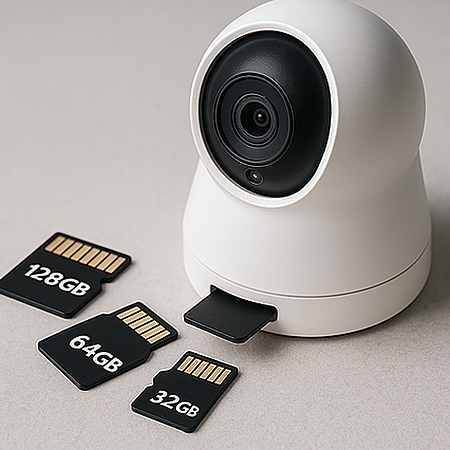
- Capacity (GB/TB): Determines how many days of footage are stored before loop recording overwrites older video. A 64GB card holds roughly 2–3 days of 1080p footage, while a 256GB card stores about 8–10 days, depending on bitrate and recording mode.
- Form Factor (microSD, HC, XC): Refers to capacity standards and file systems. SDHC supports up to 32GB, while SDXC ranges from 64GB to 2TB. Some older cameras don’t support SDXC, making compatibility checks essential.
- Read/Write Cycles: Measures how many times data can be written before the memory wears out. Consumer cards typically last 500–3,000 cycles, while surveillance-rated cards handle 20,000+ – a major difference in 24/7 recording environments.
- Operating Temperature Range: Standard cards work between 0°C and 70°C. Outdoor cameras need industrial cards rated as low as -25°C and as high as 85°C to prevent weather-related failure.
- A-Rating (A1, A2): Measures random read/write performance for apps and phones. Since security cameras record sequential video, this rating has little relevance for surveillance use.
These specs appear as symbols on the card and packaging. Incompatible capacity limits, insufficient write speeds, and low-endurance consumer cards cause most recording failures I see in security installations.
Video Compression Formats and Their Impact on Storage
Video compression determines how efficiently your camera converts raw footage into storable files. Because surveillance cameras record continuously, compression has a direct impact on how many days of footage your microSD card can retain. My Ring system showed me how adjusting compression settings alone can dramatically extend storage capacity:
- H.264 (AVC): The long-standing industry standard is still dominating most budget and mid-range surveillance cameras. At 1080p/30fps, H.264 footage typically consumes about 60GB daily per camera. A 128GB card fills in just over two days.
- H.265 (HEVC):This newer format cuts file sizes nearly in half while keeping similar image quality. The same 128GB card that stores ~2 days on H.264 can hold 4–5 days using H.265. The tradeoff is playback compatibility – some older devices require conversion to view footage.
- H.266 (VVC): The latest compression standard reduces size by another 30–40% beyond H.265. Support is currently limited to newer, premium cameras (mostly post-2023 models). Reolink models using H.266 can squeeze nearly 7 days of continuous recording onto a 128GB card.
- MJPEG: An older, inefficient format still found in budget cameras ($20–40 range). Creates massive files—a 32GB card can fill in under 8 hours at 1080p. It still appears in ultra-budget cameras due to lower processing requirements.
Your camera’s settings menu reveals available compression options. When supported, H.265 typically offers the best balance of video quality and storage efficiency. Check documentation before changing formats – some cameras need firmware updates to enable newer codecs.
Importance of High-Endurance MicroSD Cards
Regular microSD cards fail quickly in surveillance cameras because they weren’t built for nonstop recording. Some users have seen SanDisk Ultra cards failing after just 2–3 months in certain surveillance systems. Security cameras write data 24/7, while phones write occasionally. Memory cells have limited write operations before failure, and surveillance pushes regular cards beyond their limits.
High-endurance cards solve this with specially designed flash memory. SanDisk High Endurance cards run non-stop for 2+ years in the same scenarios. These specialized cards use better controllers and wear-leveling algorithms that distribute writes evenly across all memory cells, preventing burnout in frequently-used areas. They include enhanced error correction that maintains performance as the card ages. Failed cards often show that cheaper models use just a portion of available memory cells for most operations, causing rapid deterioration.
The price gap between standard and high-endurance cards has narrowed to $5–$10. A 64GB SanDisk High Endurance costs about $19.99 versus $12.99 for the regular Ultra – a small premium to avoid losing footage and frequent replacements. Stick with cards explicitly labeled “high endurance,” “surveillance-rated,” or “24/7 recording” from brands like SanDisk, Samsung, Kingston, or Lexar. Skip vague marketing terms like “professional” or “premium” without endurance ratings.
Matching MicroSD Cards To Camera Specifications
Camera manufacturers list compatible card specifications for good reason. Cases abound of Wyze camera users installing 512GB cards in devices with 256GB maximums, causing random system resets every few days. Many cameras have firmware-limited capacity restrictions. Arlo cameras typically support a maximum of 128GB despite physically accepting larger cards. Always check the manual before buying.
Most post-2020 cameras support both SDHC (4GB–32GB) and SDXC (64GB–2TB) formats, while 2015–2019 models might only recognize SDHC. Speed requirements vary – budget cameras (under $80) need Class 10 cards (10MB/s), while 4K models require UHS Speed Class 3 (U3) or Video Speed Class 30 (V30) to handle the 25–30MB/s data stream. Using too-slow cards creates choppy footage, recording gaps, or complete failure.
File system compatibility matters too. SDHC cards use the FAT32 format, which all cameras recognize, while SDXC cards use exFAT, which some older systems reject. Blink cameras made in 2018 needed firmware updates to handle 128GB SDXC cards. Check for firmware updates if larger SDXC cards won’t format. Never use microSD-to-SD adapters in security cameras – they create another failure point, and could cause intermittent recording issues.
Storage Capacity Recommendations Based on Usage
Storage needs depend on recording style. Motion-activated cameras might work fine with 32GB cards since they record only during detected movement. For 24/7 recording at 1080p, nothing below 128GB makes sense to avoid constantly overwriting footage. Figure out how many days of video you need before choosing the card size.
Resolution massively impacts storage needs. 4K cameras fill storage four times faster than 1080p models recording identical scenes. Frame rate matters too – 30fps needs exactly double the storage of 15fps. For most surveillance systems, 15fps provides smooth enough motion while halving storage requirements. When setting up a new system, buy one capacity level higher than calculated – storage needs inevitably increase as you add cameras or raise quality settings.
Real-world results vary with scene complexity. A camera watching a static wall uses 40% less storage than one monitoring a busy street. Lighting affects compression too – night vision footage with IR illumination typically needs 15–25% more space than daytime recording. Test your setup for 48 hours to determine actual needs before committing to a storage solution.
Placement planning plays a role here – learn about how to install surveillance cameras to optimize camera positioning and recording efficiency.
Cloud Storage Integration vs. Local Storage
Cloud storage and microSD cards fulfill different security roles. A combination provides complete protection. Cloud services automatically back up footage off-site, making video available anywhere and safeguarding evidence if someone steals your camera. Downsides include monthly fees ranging from $2.99 (Wyze) to $14.99 (Ring) per camera and storage caps of 30-60 days.
MicroSD storage gives complete ownership without subscriptions. A $25 high-endurance 128GB card equals 8-10 months of cloud costs. Cards work during internet outages and keep your footage private, never leaving your property. The drawbacks? Theft of both the camera and the card means lost evidence. Reviewing footage requires physically accessing the card or using sometimes clunky camera apps. A hybrid approach works best—cloud for entrance and driveway cameras, microSD-only for less critical areas.
For homes with multiple cameras, I’d suggest a mixed approach: microSD in all cameras plus cloud service for entrance, driveway, and backyard cameras where evidence matters most. Businesses should consider NVR systems with redundant drives rather than just microSD cards, since commercial insurance often requires longer retention periods.
Common Mistakes To Avoid
After researching dozens of cameras and storage issues, these pitfalls repeatedly cause problems:
Using Low-Quality Cards
Low-cost, no-name cards frequently fail in surveillance environments, sometimes within just a few months. Footage corruption and sudden card death are common in continuous recording setups. SanDisk, Samsung, Kingston, and Lexar cost 30-40% more but last 5-10 times longer. Never gamble with generic brands when evidence matters.
Ignoring Write Speed Requirements
Cards without sufficient sustained write ratings can’t keep up with 4K data streams (often 25MB/s or higher). When the bitrate spikes during motion, footage gaps or frame drops occur. Switching to V30-rated cards typically resolves the issue. Camera apps rarely warn about insufficient write speeds – they just drop frames silently.
Forgetting To Format in the Camera
Always format new cards using your camera’s built-in format function. Eufy cameras often refuse to record reliably with computer-formatted cards despite seeming to work initially. Camera formatting creates specific folder structures and optimizes allocation sizes for video recording. Computer formatting uses settings better suited for documents.
Never Checking Footage Until Needed
In real-world installations, users often install multiple cameras but rarely verify recording quality after setup. Six months later, when vandalism occurred, they discovered three cameras stopped recording weeks earlier due to card corruption. Check random footage monthly from each camera – this five-minute task prevents discovering system failure when footage matters most.
Improper Card Insertion/Removal
Cards can fail permanently when removed while recording LEDs indicate activity. Always power down cameras completely before removing storage. Many surveillance systems handle hot-swapping poorly, and interrupting active writes damages card sectors permanently. This mistake has ruined 128GB cards and weeks of footage.
Overlooking Environmental Conditions
Attic cameras often fail during summer heat, where sustained temperatures can approach or exceed standard cards’ 158°F (70°C) operating limits – especially inside enclosed camera housings. Outdoor cameras can face brutal temperature swings – 120°F days to below 0°F nights, depending on where you live. For harsh environments, use industrial-grade cards rated -13°F to 185°F (-25°C to 85°C), like Samsung PRO Endurance, despite the 15–20% premium.
Missing Regular Replacement Windows
Even premium cards wear out eventually. Replace cards in continuously recording cameras yearly, regardless of condition. For motion-activated systems, 18–24 months works well. The $20–$30 annual cost per camera beats losing irreplaceable footage.
Backup and Redundancy Strategies
Most people realize the importance of having a backup only after losing footage. These approaches protect surveillance data:
- Dual-Recording Cameras: Reolink and similar models record to both microSD and NVR simultaneously, providing instant backup if either storage fails.
- Regular Manual Backups: Monthly copying of 30 days of entrance footage to external drives ensures important events remain available even if cards fail.
- NVR Integration: Connecting primary cameras to Network Video Recorders with mirrored drives automatically protects footage from hard drive failures.
- Rotating Card System: For driveway cameras, swap between two cards weekly, keeping the previous week’s card stored safely indoors.
- Automatic Cloud Sync: Configure motion events to upload to the cloud while maintaining continuous microSD recording, preserving critical events even if the cameras get stolen.
- Physical Security: Install cameras with internal microSD slots rather than external ones to prevent card theft without removing the entire camera.
- Scheduled Verification: Review sample footage monthly from each camera and storage location to confirm proper recording and retention.
- Storage Diversification: For critical cameras, use different storage technologies – some to microSD, others to NVR, some to cloud – preventing single-point failures.
Home users need cloud backup for entrances, plus a microSD for general coverage. Businesses require more robust solutions – typically onsite NVR with RAID 5 protection plus offsite cloud backup to meet legal retention requirements.